
Islamic Geometric Patterns
Loading the math board and drawing, please wait…
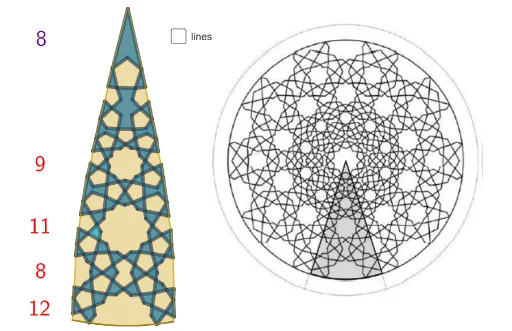
This example demonstrates the construction of Islamic geometric patterns. Key mathematical concepts include symmetry, polygons, and geometric constructions. Using commands like CircleArc, Point, and Polygon in GeoGebra, complex geometric patterns can be created. Suitable for middle school and above students to learn geometric constructions and symmetry.
GeoGebra Commands & Parameters
CircleArc(I, J, H) → cPoint(c) → S_1Point(c) → T_1Point(c) → U_1Polygon(N_1, G_6, F_6, E_6) → vierhoek1, n_1, g_6, f_6, e_6Polygon(F_6, H_6, W_5, V_5) → vierhoek2, f, h_6, w_5, v_5Polygon(E_6, L_1, M_1) → driehoek1, m_1, g, l_1Polygon(L_1, U_5, K_1) → driehoek2, k_1, h, u_5Polygon(U_5, V_5, R_5, T_5) → vierhoek3, i, j, r_5, t_5Polygon(W_5, Z_5, A_6, Q_5) → vierhoek4, k, z_5, a_6, q_5Polygon(A_6, B_6, Z_4, A_5) → vierhoek5, l, b_6, z_4, a_5Polygon(K_6, U_1, J_6, I_6) → vierhoek6, k_6, u_1, j_6, i_6Polygon(L_6, O_1, J_6) → driehoek3, m, l_6, o_1Polygon(I_6, W_4, Z_4, C_6) → vierhoek7, n, w_4, p, c_6Polygon(O_1, P_1, V_4) → driehoek4, v_4, q, p_1Polygon(V_4, U_4, T_4, W_4) → vierhoek8, r, u_4, t_4, sPolygon(T_4, D_6, M_4, S_4) → vierhoek9, t, d_6, m_4, s_4Polygon(S_4, R_4, B_5, A_5) → vierhoek10, d, r_4, b_5, ePolygon(Q_5, P_5, O_5, N_5) → vierhoek11, f_1, p_5, o_5, n_5Polygon(N_5, M_5, S_5, R_5) → vierhoek12, g_1, m_5, s_5, h_1Polygon(M_5, K_5, J_5, L_5) → vierhoek13, i_1, k_5, j_5, l_5Polygon(J_5, I_1, J_1) → driehoek5, j_1, q_1, r_1Polygon(O_5, Q_4, C_5, D_5) → vierhoek14, s_1, q_4, c_5, d_5Polygon(Q_4, R_4, O_4, P_4) → vierhoek15, t_1, a_1, o_4, p_4Polygon(M_4, N_4, L_4, K_4) → vierhoek16, b_1, n_4, l_4, k_4Polygon(Q_1, R_1, L_4) → driehoek6, c_1, d_1, e_1Polygon(R_1, H_1, G_4) → driehoek7, g_4, f_2, g_2Polygon(K_4, I_4, J_4, O_4) → vierhoek17, h_2, i_4, j_4, i_2Polygon(K_5, D_5, E_5, F_5) → vierhoek18, j_2, k_2, e_5, f_5Polygon(F_5, G_5, U_3, H_5) → vierhoek19, l_2, g_5, u_3, h_5Polygon(I_1, H_5, E_1) → driehoek8, m_2, n_2, p_2Polygon(D_1, I_5, C_1) → driehoek9, q_2, r_2, i_5Polygon(U_3, V_3, W_3, I_5) → vierhoek20, s_2, v_3, w_3, t_2Polygon(I_4, G_4, F_4, H_4) → vierhoek21, a_2, b_2, f_4, h_4Polygon(F_4, E_4, C_4, D_4) → vierhoek22, c_2, e_4, c_4, d_4Polygon(G_1, F_1, E_4) → driehoek10, d_2, e_2, f_3Polygon(C_4, K_3, N_3, B_4) → vierhoek23, g_3, k_3, n_3, b_4Polygon(W_3, Z_3, O_3, R_3) → vierhoek24, h_3, z_3, o_3, r_3Polygon(O_3, A_4, N_3, M_3) → vierhoek25, i_3, a_4, j_3, m_3Polygon(F_1, R, J_3, I_3, K_3, L_3) → veelhoek1, l_3, r_6, p_3, q_3, s_3, t_3Polygon(C_1, S_3, R_3, P_3, Q_3, B_1) → veelhoek2, a_3, b_3, c_3, d_3, e_3, m_6Polygon(P_3, A_3, B_3, C_3) → vierhoek26, n_6, p_6, q_6, s_6Polygon(M_3, W_2, Z_2, A_3) → vierhoek27, t_6, w_2, z_2, f_7Polygon(W_2, I_3, U_2, V_2) → vierhoek28, g_7, h_7, u_2, v_2Polygon(R, Q, H_3) → driehoek11, i_7, r_7, q_7Polygon(U_2, H_3, S_2, T_2) → vierhoek29, j_7, k_7, l_7, m_7Polygon(S_2, Q_2, P_2, R_2) → vierhoek30, n_7, p_7, s_7, t_7Polygon(B_1, T_3, A_1) → driehoek12, a_7, b_7, c_7Polygon(T_3, C_3, D_3, E_3) → vierhoek31, d_7, e_7, f_8, g_8Polygon(E_3, F_3, N_2, M_2) → vierhoek32, h_8, i_8, j_8, k_8Polygon(Z, M_2, W) → driehoek13, w, z_1, l_8Polygon(N_2, G_3, O_2, J_2) → vierhoek33, m_8, n_8, o_2, p_8Polygon(Q_2, P, O) → driehoek14, o, q_8, p_9Polygon(M_6, P_2, K_2, O_2) → vierhoek34, r_8, s_8, t_8, a_8Polygon(O, N, H_2, G_2, K_2, L_2) → veelhoek3, o_6, n_9, b_8, c_8, d_8, e_8Polygon(W, N_6, J_2, F_2, I_2, V) → veelhoek4, w_1, f_9, g_9, h_9, i_9, vPolygon(F_2, G_2, D_2, C_2, Z_1, W_1, V_1, A_2, B_2, E_2) → veelhoek5, j_9, b_9, k_9, l_9, m_9, q_9, r_9, s_9, t_9, a_9Polygon(V, B_2, U) → driehoek15, u, v_1, c_9Polygon(N, C_2, M) → driehoek16, m_{10}, n_{10}, d_9Polygon(L, K, W_1) → driehoek17, e_9, l_{10}, k_{10}Polygon(T, V_1, S) → driehoek18, s_{10}, t_{10}, f_{10}Polygon(G, S, I, K) → vierhoek35, g_{10}, s_{11}, i_{10}, k_{11}Polygon(H, O_1, P, O, N, M, L, K, G, S, T, U, P_1, V, W, Z, A_1, B_1, C_1, D_1, E_1, I_1, J_1, Q_1, K_1, L_1, M_1, J, N_1, S_1, T_1, U_1, R_1, H_1, G_1, F_1, R, Q) → veelhoek6, h_{10}, q_{11}, p_{11}, o_7, n_{11}, m_{11}, l_{11}, k_{12}, g_{11}, s_{12}, t_{11}, j_{10}, u_6, v_6, w_6, z_6, d_{10}, e_{10}, f_{11}, h_{11}, i_{11}, j_{11}, p_{10}, a_{11}, b_{11}, c_{11}, d_{11}, j_{12}, e_{11}, f_{12}, g_{12}, h_{12}, q_{10}, r_{10}, a_{10}, b_{10}, c_{10}, r_{11}Polygon(O_6, P_6, A_7, Q_6, R_6, S_6, T_6, U_6, V_6, W_6, Z_6) → veelhoek7, i_{12}, b_{12}, c_{12}, l_{12}, m_{12}, n_{12}, p_{12}, q_{12}, r_{12}, t_{12}, a_{12}Intersect(c, j_{12}, 1) → B_7Intersect(c, e_{11}, 1) → C_7Intersect(c, f_{12}, 2) → D_7Intersect(c, j_{12}, 1) → K_7Intersect(c, j_{12}, 1) → L_7PolyLine(E_7, F_7, G_7, H_7, I_7, J_7, M_7) → d_{12}Segment(N_7, J_7) → e_{12}Segment(F_7, O_7) → f_{13}Segment(G_7, Q_6) → g_{13}Segment(R_6, P_7) → h_{13}Segment(A_7, Q_7) → i_{13}Segment(T_6, R_7) → j_{13}Segment(W_6, S_7) → k_{13}Polygon(U_6, T_7, U_7, V_7, W_7, Z_7, A_8, B_8, V_6) → veelhoek8, l_{13}, m_{13}, u_7, v_7, w_7, z_7, n_{13}, p_{13}, q_{13}Segment(B_8, C_8) → r_{13}Segment(T_7, D_8) → s_{13}Polygon(W_7, E_8, F_8, G_8, H_8, I_8) → veelhoek9, t_{13}, a_{13}, b_{13}, c_{13}, d_{13}, e_{13}Segment(V_7, J_8) → f_{14}Segment(I_8, K_8) → g_{14}Segment(E_8, L_8) → h_{14}Segment(G_8, M_8) → i_{14}Segment(G_8, N_8) → j_{14}Segment(Z_7, O_8) → k_{14}Segment(O_6, I_7) → l_{14}CircleSector(R_8, S_8, T_8) → c_{14}
AI Drawing Prompt Reference
Create an Islamic geometric pattern based on a circle. Place multiple points on the circumference)Skip and connect them to form numerous polygons, including quadrilaterals and triangles. The pattern expands outward from the center, featuring symmetric star shapes and polygon combinations. Start with a circle, mark points on it, then sequentially connect these points to construct various polygons, gradually filling the circular area to achieve an intricate tessellated design.
The prompt above was compiled from the original drawing commands and is for reference only.