
Introduction to Trigonometry via Similar Triangles
Loading the math board and drawing, please wait…
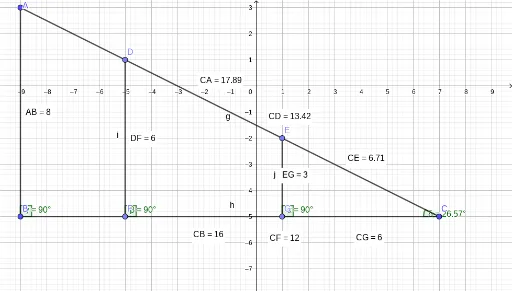
This example introduces basic trigonometric concepts through similar triangles. It demonstrates how to understand sine, cosine, and tangent by utilizing the properties of similar triangles. Construction highlights include using Segment, Point, Distance commands to create triangles and measuring angles with the Angle command. Suitable for students in middle school and above to learn the basics of trigonometry.
GeoGebra Commands & Parameters
Segment(B, A) → fSegment(A, C) → gSegment(C, B) → hPoint(g) → DPoint(g) → EPoint(h) → FPoint(h) → GSegment(D, F) → iSegment(E, G) → jDistance(A, B) → distanceABMidpoint(A, B) →Distance(D, F) → distanceDFMidpoint(D, F) →Distance(E, G) → distanceEGMidpoint(E, G) →Distance(C, E) → distanceCEMidpoint(C, E) →Distance(C, D) → distanceCDMidpoint(C, D) →Distance(C, A) → distanceCAMidpoint(C, A) →Distance(C, G) → distanceCGMidpoint(C, G) →Distance(C, F) → distanceCFMidpoint(C, F) →Distance(C, B) → distanceCBMidpoint(C, B) →Angle(C, G, E) → αAngle(C, F, D) → βAngle(C, B, A) → γAngle(E, C, G) → δ
AI Drawing Prompt Reference
Draw a triangle ABC, then take points D and E on side BC, and points F and G on side AC. Connect DF and EG to form two new triangles. Measure the lengths of the sides and angles of triangle ABC, including AB, BC, CA, CD, CE, CF, CG, DF, DE, DG, EF, FG, and angles A, B, C, D, E, F, G.
The prompt above was compiled from the original drawing commands and is for reference only.