
Introduction to Motion
Loading the math board and drawing, please wait…
In collections
Transformations
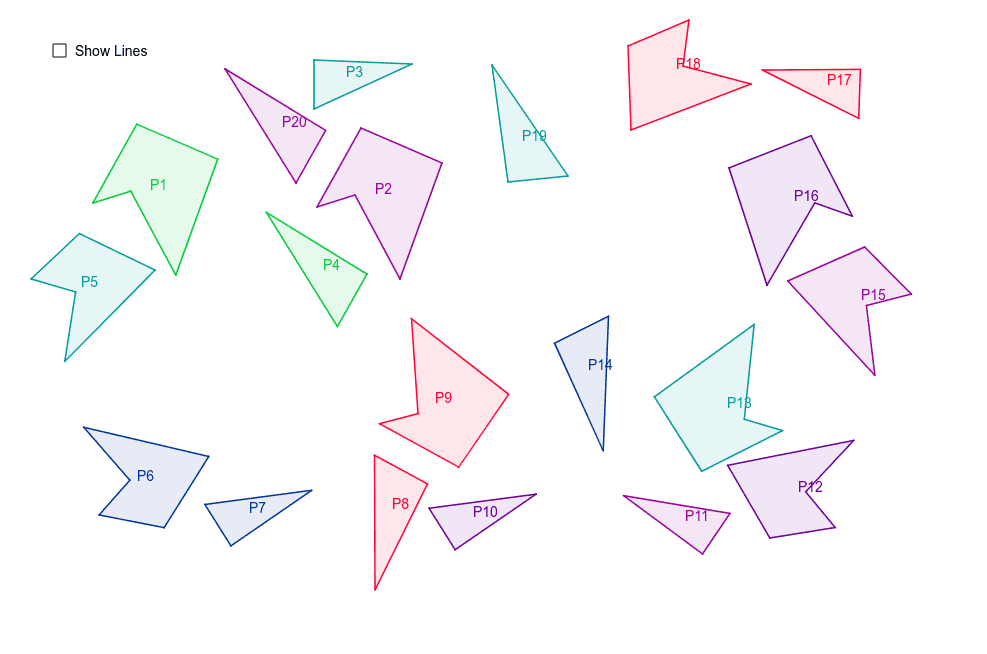
This example demonstrates the relationship between motion and congruence. Using commands like Polygon, Line, and Mirror, students can understand geometric transformations and congruence. Suitable for middle school and above students to learn about geometric transformations and congruent figures.
GeoGebra Commands & Parameters
Polygon(A, B, C, D, E) → P2, a, b, c, d, ePolygon(F, G, H) → P19, h, f, gPolygon(I, J, K) → P3, k, i, jPolygon(L, M, N, O, P) → P18, l, m, n, o, pLine(Q, R) → qLine(S, T) → rLine(U, q) → sLine(U, r) → tMirror(I, q) → I'Mirror(J, q) → J'Mirror(K, q) → K'Polygon(I', J', K') → P10, k', i', j'Mirror(I', r) → I''Mirror(J', r) → J''Mirror(K', r) → K''Polygon(I'', J'', K'') → P11, k'', i'', j''Mirror(I'', t) → I'''Mirror(J'', t) → J'''Mirror(K'', t) → K'''Polygon(I''', J''', K''') → P7, k''', i''', j'''Mirror(F, q) → F'Mirror(G, q) → G'Mirror(H, q) → H'Polygon(F', G', H') → P14, h', f', g'Mirror(F', q) → F''Mirror(G', q) → G''Mirror(H', q) → H''Mirror(F', t) → F''_1Mirror(G', t) → G''_1Mirror(H', t) → H''_1Polygon(F''_1, G''_1, H''_1) → poly2''_1, h''_1, f''_1, g''_1Mirror(F''_1, q) → VMirror(G''_1, q) → WMirror(H''_1, q) → ZPolygon(V, W, Z) → P4, z, v, wMirror(A, r) → A'Mirror(B, r) → B'Mirror(C, r) → C'Mirror(D, r) → D'Mirror(E, r) → E'Polygon(A', B', C', D', E') → P16, a', b', c', d', e'Mirror(A', t) → A''Mirror(B', t) → B''Mirror(C', t) → C''Mirror(D', t) → D''Mirror(E', t) → E''Polygon(A'', B'', C'', D'', E'') → P1, a'', b'', c'', d'', e''Mirror(A, q) → A'_1Mirror(B, q) → B'_1Mirror(C, q) → C'_1Mirror(D, q) → D'_1Mirror(E, q) → E'_1Polygon(A'_1, B'_1, C'_1, D'_1, E'_1) → P9, a'_1, b'_1, c'_1, d'_1, e'_1Mirror(A'_1, r) → A_1Mirror(B'_1, r) → B_1Mirror(C'_1, r) → C_1Mirror(D'_1, r) → D_1Mirror(E'_1, r) → E_1Polygon(A_1, B_1, C_1, D_1, E_1) → P13, a_1, b_1, c_1, d_1, e_1Mirror(V, s) → V'Mirror(W, s) → W'Mirror(Z, s) → Z'Polygon(V', W', Z') → P8, z', v', w'Mirror(I, r) → I'_1Mirror(J, r) → J'_1Mirror(K, r) → K'_1Polygon(I'_1, J'_1, K'_1) → P17, k'_1, i'_1, j'_1Mirror(L, s) → L'Mirror(M, s) → M'Mirror(N, s) → N'Mirror(O, s) → O'Mirror(P, s) → P'Polygon(L', M', N', O', P') → P12, l', m', n', o', p'Mirror(L', t) → L''Mirror(M', t) → M''Mirror(N', t) → N''Mirror(O', t) → O''Mirror(P', t) → P''Polygon(L'', M'', N'', O'', P'') → P6, l'', m'', n'', o'', p''Mirror(L'', q) → L'''Mirror(M'', q) → M'''Mirror(N'', q) → N'''Mirror(O'', q) → O'''Mirror(P'', q) → P'''Polygon(L''', M''', N''', O''', P''') → P5, l''', m''', n''', o''', p'''Mirror(L''', t) → F_1Mirror(M''', t) → G_1Mirror(N''', t) → H_1Mirror(O''', t) → I_1Mirror(P''', t) → J_1Polygon(F_1, G_1, H_1, I_1, J_1) → P15, f_1, g_1, h_1, i_1, j_1Mirror(V', q) → V''Mirror(W', q) → W''Mirror(Z', q) → Z''Polygon(V'', W'', Z'') → P20, z'', v'', w''
AI Drawing Prompt Reference
First, draw a pentagon. Then, draw some line segments as reference. Next, reflect the vertices of the pentagon across these line segments to create symmetric figures. Continue with multiple mirror operations to form new symmetric figures. Finally, draw a triangle and combine it with the symmetric pentagon to form the complete figure structure.
The prompt above was compiled from the original drawing commands and is for reference only.