
Intersection of Sphere, Cone, and Cylinder
Loading the math board and drawing, please wait…
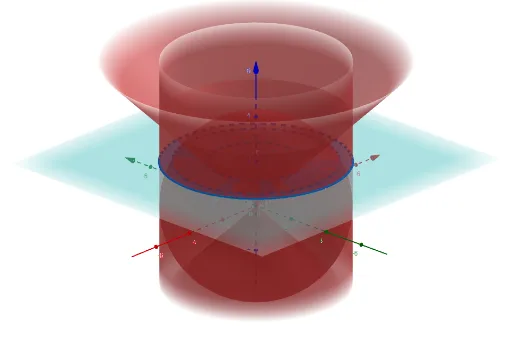
① This GeoGebra example demonstrates the intersections among a sphere, a cone, and a cylinder in 3D space, showing the resulting curves or cross-sections. ② Core mathematical concepts include solid geometry, equations of quadric surfaces (sphere, cone, cylinder), linear equations in space, tangent functions, and introductory calculus ideas. ③ Construction highlights: using commands IntersectPath and Intersect, the model defines multiple equation objects (eq1 to eq14) and auxiliary points, lines, and planes, then computes intersection paths or points between surfaces, possibly with sliders for dynamic parameter adjustment. ④ Suitable for high school to early college students, this example aids in visualizing spatial analytic geometry, surface intersections, and 3D graphing, and serves as a teaching tool for instructors explaining spatial relationships.
GeoGebra Commands & Parameters
IntersectPath(eq1, eq5) → fIntersectPath(eq4, eq5) → gIntersectPath(eq4, eq1) → hIntersect(g, f) → AIntersectPath(eq1, eq6) → cIntersectPath(p, eq6) → dIntersectPath(r, eq13) → eIntersectPath(r, eq6) → sIntersectPath(r, eq14) → t
AI Drawing Prompt Reference
Create a 3D scene with a sphere, a cone, and a cylinder. Show the intersection curves between each pair of surfaces: sphere-cone, cone-cylinder, and cylinder-sphere. Mark the point where two of these curves meet. Then add an auxiliary plane and two auxiliary lines, and display the curve where the plane cuts the cylinder, as well as the intersection points of each line with the cone and the cylinder. The final image should clearly show all these spatial curves and points in a single coordinate system.
The prompt above was compiled from the original drawing commands and is for reference only.