
Intersection of a Cone and a Sphere
Loading the math board and drawing, please wait…
In collections
intersection: surface-surface, curve-curve
intersection: surface-surface, curve-curve
intersection: surface-surface, curve-curve
intersection: surface-surface, curve-curve
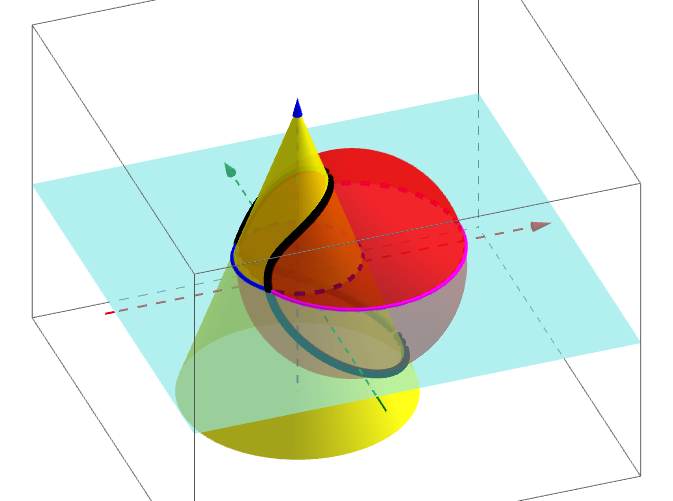
This GeoGebra example demonstrates the geometric intersection of a cone and a sphere in three-dimensional space, visualizing the spatial curve formed by their intersection. Core mathematical concepts include solid geometry, surface intersections, spatial loci, tangent properties, and geometric symmetries (such as isosceles and rhombic cross-sections). To construct this model, the GeoGebra commands Cone and Sphere are used to define the primary 3D shapes, Line is used for auxiliary construction lines, and Intersect along with IntersectPath are crucial for calculating the intersection points and the continuous intersection path. The construction involves key parameters and objects such as r2, r1, a, c, d, r, j, m, M, N, b, e, f, g, h, A, and B. This example is highly suitable for high school or college-level solid geometry and spatial analytic geometry courses, serving as a visual teaching tool for understanding complex spatial intersections.
GeoGebra Commands & Parameters
Cone((0, 0, -7), (0, 0, 7), r1) → a, c, dLine((0, 0, 0), (-3, 0, 5)) → mIntersect(zAxis, xAxis) → MIntersect(xAxis, yAxis) → NSphere((b, 0, 0), r2) → eIntersectPath(f, a) → gIntersectPath(f, e) → hIntersectIntersectIntersect(g, h) → A, B, ,
AI Drawing Prompt Reference
Please draw the intersection curve of a cone and a sphere in three-dimensional space. First, define a cone with its vertex at the origin, the center of its base on the z-axis, and radius r1. Then, define an auxiliary line starting from the origin to the point (-3, 0, 5). Next, define a sphere centered at some point b on the x-axis with radius r2. Finally, calculate and draw the intersection curve of the cone and the sphere.
The prompt above was compiled from the original drawing commands and is for reference only.