
Intersecting Planes: Spatial Geometry with Exponential Functions and Limits
Loading the math board and drawing, please wait…
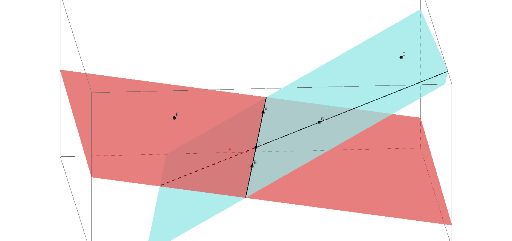
①This GeoGebra example dynamically demonstrates the intersection of two planes in 3D space, while incorporating exponential functions, limits, division, circles, and tangent lines to create a multi-concept geometric scene. ②Core mathematical concepts include spatial plane relationships (intersection and line of intersection), behavior of exponential functions and their limits, tangent properties of circles, and the role of division in geometric constructions. ③Construction highlights: using the Plane command to define planes, Line to create the intersection line, Point and PointIn to place key points (G, B, D, S, N, R, A, C, E), and including circle c and tangent line h to enrich the visualization. ④Suitable for high school to early college students, this example aids in understanding solid geometry, functions and limits intuitively, and serves as a teaching tool for GeoGebra 3D construction, illustrating how spatial concepts interact with functional behavior.
GeoGebra Commands & Parameters
Plane(G, B, D) → SPlane(B, D, N) → RLine(B, D) → cLine(D, G) → hPoint(c) → APointIn(S) → CPointIn(R) → E
AI Drawing Prompt Reference
Draw two intersecting planes S and R defined by points G, B, D and B, D, N respectively. Draw a line c through points B and D, and another line h through points D and G as the tangent to circle c. Pick a point A on line c, and points C and E on planes S and R respectively. This creates a 3D geometric figure illustrating the intersection of planes, tangent lines to circles, and the behavior of exponential functions and their limits.
The prompt above was compiled from the original drawing commands and is for reference only.