
Interpreting Negative Numbers Practice
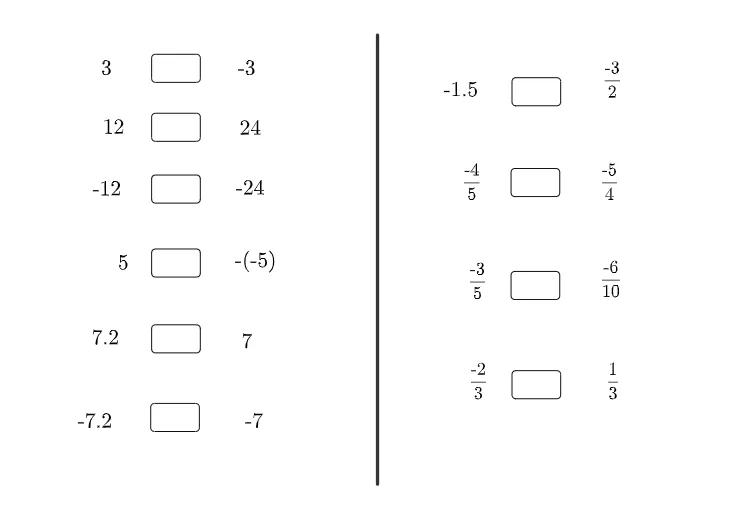
Loading the math board and drawing, please wait…
This example demonstrates how to use GeoGebra to construct line segments, triangles, and other geometric figures to interpret negative numbers. It involves core math concepts like line segments, orthocenters, right triangles, and scalene triangles. The construction uses commands like Textfield and Segment, along with objects such as InputBox and text for interactive exploration. It is suitable for middle school mathematics education to help students understand and apply negative numbers in geometry.
GeoGebra Commands & Parameters
Textfield() → InputBox2Textfield() → InputBox3Textfield() → InputBox4Textfield() → InputBox5Textfield() → InputBox6Textfield() → InputBox7Textfield() → InputBox8Textfield() → InputBox9Textfield() → InputBox10Textfield() → InputBox11Segment(A, B) → f
AI Drawing Prompt Reference
Create a geometry practice diagram for interpreting negative numbers. Start by placing several input boxes for entering values or expressions. Then draw a line segment connecting two points as the base. Construct a triangle on this segment, ensuring it is a right scalene triangle. Mark the orthocenter of the triangle to illustrate the geometric meaning of negative numbers. Arrange the elements clearly so students can interact by changing input values and observing how the figure changes, thereby understanding negative numbers in geometry.
The prompt above was compiled from the original drawing commands and is for reference only.