
Interactive Unit Circle by sbatts
Loading the math board and drawing, please wait…
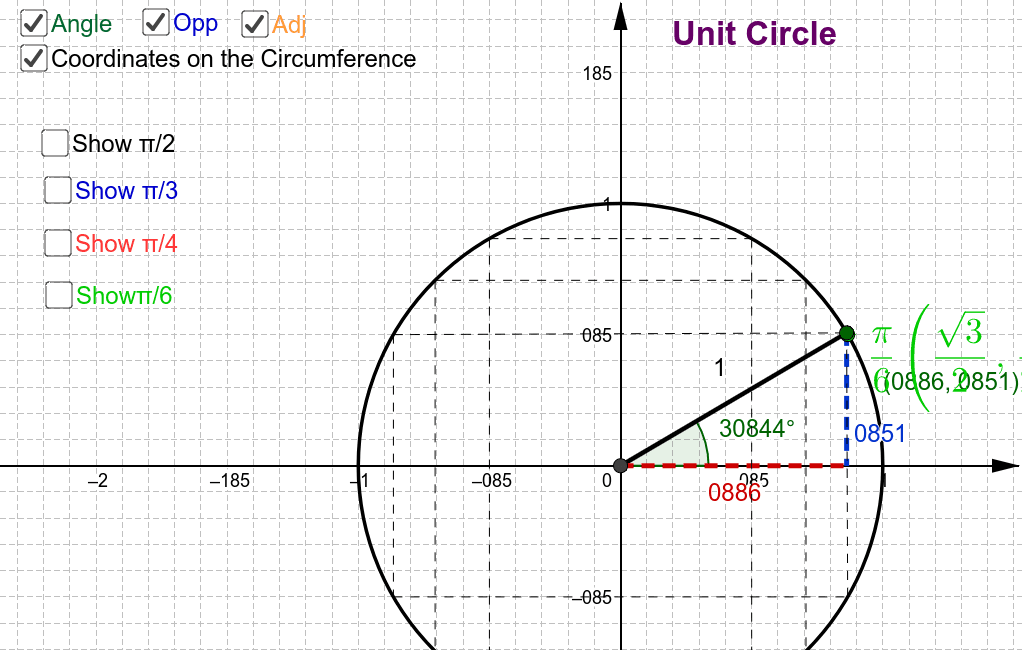
This example demonstrates the interactive properties of the unit circle. It involves key concepts such as the unit circle, angles, and vectors. Using GeoGebra commands like Intersect, Circle, and Mirror, it dynamically shows points on the unit circle and related vectors. Suitable for high school precalculus education.
GeoGebra Commands & Parameters
Intersect(xAxis, yAxis) → ACircle(A, 1) → cMirror(B, yAxis) → B'Mirror(B, xAxis) → B'_1Mirror(B', xAxis) → B''Mirror(C, yAxis) → C'Mirror(C', xAxis) → C''Mirror(C'', yAxis) → C'''Mirror(D, yAxis) → D'Mirror(D', xAxis) → D''Mirror(D'', yAxis) → D'''Point(c) → ISegment(I, A) → gAngle(E, A, I) → αOrthogonalLine(I, xAxis) → hIntersect(h, xAxis) → QLine(A, Q) → iSegment(I, Q) → jSegment(A, Q) → kSegment(C, C''') → pSegment(D, D''') → qSegment(D', D'') → rSegment(C', C'') → sSegment(B', B'') → tSegment(I, B'_1) → f_1Segment(D', D) → g_1Segment(C', C) → h_1Segment(B', I) → i_1Segment(B'', B'_1) → j_1Segment(C'', C''') → k_1Segment(D'', D''') → l_1
AI Drawing Prompt Reference
Draw a unit circle with key points to demonstrate relationships between angles, vectors, and trigonometry. Start with the intersection of coordinate axes, then draw the unit circle and generate symmetric points through mirror operations. Connect these points to the center to form vectors. Label angles and perpendicular lines, draw segments from the center to the intersection of the perpendicular line with the x-axis, and connect related points to show vector and angle geometry.
The prompt above was compiled from the original drawing commands and is for reference only.