
Interactive GeoGebra quiz on quadrilateral implication chains: When is a trapezo
Loading the math board and drawing, please wait…
In collections
Trapez - Eigenschaften und Konstruktionen
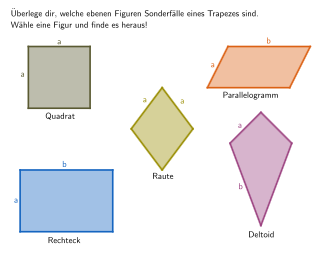
This GeoGebra lesson uses interactive multiple-choice and open questions to help students test and reason about implication statements between special quadrilaterals. It focuses on relationships involving a trapezoid (Trapez), parallelogram (Parallelogramm), rhombus (Raute), square (Quadrat), rectangle (Rechteck), and kite/deltoid (Deltoid). The key math concepts are the definitions of these shapes and which containment/implication claims are true or false. Construction-wise, the geometry is built with Polygon to create several labeled quadrilaterals (general Viereck plus specific ones like Quadrat, Parallelogramm, Raute, Deltoid, and their A/B/C/D point variants). The lesson uses If to control which statements/visual cues appear depending on the configuration, and Angle to measure/visualize critical angles used for arguments (e.g., adjacent angles related by the 180° supplement property in a parallelogram). The activity is intended for grades around 5–6 and early geometry learning, supporting classification, property application, and simple proof reasoning using angle relationships.
GeoGebra Commands & Parameters
Polygon(AViereck, BViereck, DViereck, CViereck) → Quadrat, aviereck, bviereck, dviereck, cviereckPolygon(ARaute, BRaute, CRaute, DRaute) → Raute, araute, braute, craute, drautePolygon(ARechteck, BRechteck, CRechteck, DRechteck) → Rechteck, arechteck, brechteck, crechteck, drechteckPolygon(AParallelogramm, BParallelogramm, CParallelogramm, DParallelogramm) → Parallelogramm, aparallelogramm, bparallelogramm, cparallelogramm, dparallelogrammPolygon(ADeltoid, BDeltoid, CDeltoid, DDeltoid) → Deltoid, adeltoid, bdeltoid, cdeltoid, ddeltoidPolygon((-3.5, -4), (-3.5, 5.5), (10.5, 5.5), (10.5, -4)) → Aufgabe, f, g, h, iPolygon((-2, -2), (-2, 3), (3, 3), (3, -2)) → EQuadrat, EQuadrat_{2}, EQuadrat_{3}, EQuadrat_{4}, EQuadrat_{5}Polygon((-2.5, -1.7), (-2.5, 2.3), (3.5, 2.3), (3.5, -1.7)) → ERechteck, ERechteck_2, ERechteck_1, ERechteck_3, ERechteck_4Polygon((-3.2, -2), (-2.2, 2), (3.5, 2), (2.5, -2)) → EParallelogramm, EParallelogramm_2, EParallelogramm_3, EParallelogramm_4, EParallelogramm_1Polygon((0.5, -2), (-1.5, 0.5), (0.5, 3), (2.5, 0.5)) → ERaute, ERaute_2, ERaute_1, ERaute_3, ERaute_4Polygon((0.5, -3), (-1, 1.5), (0.5, 3), (2, 1.5)) → EDeltoid, EDeltoid_2, EDeltoid_1, EDeltoid_3, EDeltoid_4If(clickedParallelogramm, SelectedIndex[dropdownParallelogramm], If[clickedRaute, SelectedIndex[dropdownRaute], If[clickedDeltoid, SelectedIndex[dropdownDeltoid], SelectedIndex[dropdown]]]) → indexIf(clickedDeltoid, index ≟ 3, index ≟ 2) → correctDropAngle(BEQuadrat, AEQuadrat, DEQuadrat) → αQAngle(AEQuadrat, DEQuadrat, CEQuadrat) → δQAngle(DEQuadrat, CEQuadrat, BEQuadrat) → γQAngle(CEQuadrat, BEQuadrat, AEQuadrat) → βQAngle(BERaute, AERaute, DERaute) → αRAngle(CERaute, BERaute, AERaute) → βRAngle(DERaute, CERaute, BERaute) → γRAngle(AERaute, DERaute, CERaute) → δRAngle(BERechteck, AERechteck, DERechteck) → αReAngle(CERechteck, BERechteck, AERechteck) → βReAngle(DERechteck, CERechteck, BERechteck) → γReAngle(AERechteck, DERechteck, CERechteck) → δReAngle(BEPar, AEPar, DEPar) → αPAngle(CEPar, BEPar, AEPar) → βPAngle(DEPar, CEPar, BEPar) → γPAngle(AEPar, DEPar, CEPar) → δPPolygon(A, B, C, D) → q1, a, b, c, d
AI Drawing Prompt Reference
Draw a graphic showing various quadrilaterals and their relationships. First, draw a general quadrilateral as a base, then add special quadrilaterals such as trapezoids, parallelograms, rhombuses, squares, rectangles, and deltoids, each labeled with its vertices. Next, use angle tools to measure and label key angles, like the angles formed by diagonals in a parallelogram or right angles in a rectangle. The graphic should clearly show the inclusion relationships and property differences between these quadrilaterals, suitable for a geometry lesson demonstration.
The prompt above was compiled from the original drawing commands and is for reference only.