
Interactive Fraction Simplification and Extension Practice
Loading the math board and drawing, please wait…
In collections
Bruchzahlen: Erweitern und Kürzen
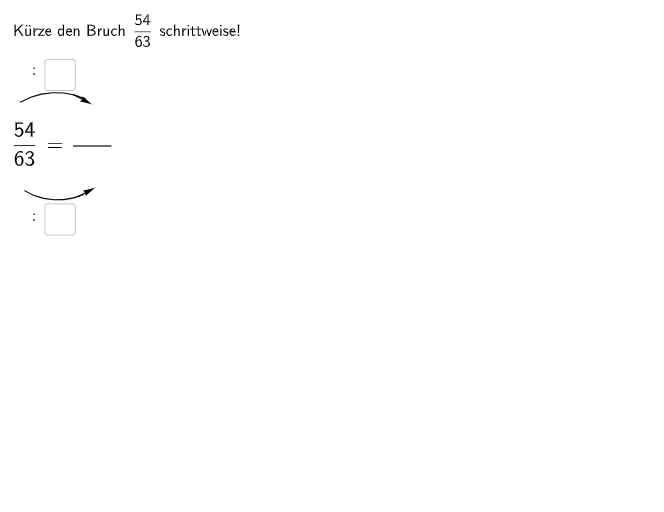
This GeoGebra material provides practice on fraction simplification (Kürzen) and extension (Erweitern) through two multiple-choice questions and one open-ended problem. The first question asks students to find the missing denominator, the second asks for the missing numerator, and the open question requires identifying and correcting an error in a step-by-step fraction reduction process. The construction uses Textfield, Segment, Point, Vector, CircleArc for geometric visualization of fractions, with If conditional statements for immediate feedback and SpeechBubble for hints. Designed for grade 5-6 students, suitable for classroom practice or homework.
GeoGebra Commands & Parameters
Textfield(aInput) → InputBox1Textfield(bInput) → InputBox2Textfield(cInput) → InputBox3Textfield(dInput) → InputBox4Segment(A, B) → fCircleArc(C, D, E) → cCircleArc(F, G, H) → dPoint(c) → IVector(I, J) → uPoint(d) → KVector(K, L) → vIf(cInput ≟ 3 ∧ dInput ≟ 3, aInput ≟ 18, If[cInput ≟ 6 ∧ dInput ≟ 6, aInput ≟ 6]) → c1If(cInput ≟ 3 ∧ dInput ≟ 3, bInput ≟ 21, If[cInput ≟ 6 ∧ dInput ≟ 6, bInput ≟ 7]) → c2Textfield(eInput) → InputBox5Textfield(fInput) → InputBox6Textfield(gInput) → InputBox7Textfield(hInput) → InputBox8Segment(A_{1}, B_{1}) → f_{1}CircleArc(C_{1}, D_{1}, E_{1}) → c_{1}CircleArc(F_{1}, G_{1}, H_{1}) → d_{1}Point(c_{1}) → I_{1}Vector(I_{1}, J_{1}) → u_{1}Point(d_{1}) → K_{1}Vector(K_{1}, L_{1}) → v_{1}If(cInput ≟ 3 ∧ dInput ≟ 3, c5 ∧ c6 ∧ c7 ∧ c8, If[cInput ≟ 6 ∧ dInput ≟ 6, c1 ∧ c2 ∧ c3 ∧ c4]) → cor2SpeechBubbleRight(O, 4.5, 1.7) → bubble1SpeechBubbleRight(P, 8.3, 2.7) → bubble2Segment(S, T) → gTextfield(iInput) → InputBox9Textfield(jInput) → InputBox10Textfield(kInput) → InputBox11Textfield(lInput) → InputBox12Textfield(mInput) → InputBox13Segment(U, V) → hSpeechBubbleLeft(M_1 - (0, 0.2), 7.5, 1.5) → bubble3Segment(N_1, O_1) → iTextfield(nInput) → InputBox14Textfield(oInput) → InputBox15If(nInput ≟ 9, oInput ≟ 15, If[nInput ≟ 6, oInput ≟ 10, If[nInput ≟ 3, oInput ≟ 5]]) → c15Textfield(pInput) → InputBox16Textfield(qInput) → InputBox17Textfield(rInput) → InputBox18Textfield(sInput) → InputBox19Segment(P_1, Q_1) → jSpeechBubbleRight(T_1, 8.3, 2.7) → poly1
AI Drawing Prompt Reference
Create a classroom-style interactive fraction practice diagram with several editable input boxes for fraction numerator and denominator choices. Draw one pair of connected line segments using fixed endpoints, and place two circular arcs near them to represent two related fraction states. Mark the arc endpoints with points, and draw direction vectors starting from those points. Add a right-aligned speech bubble as a hint for the current selection, and another left-aligned speech bubble to guide an error-correction step. Then include two more line segments representing a second exercise setup, and add a final right-aligned speech bubble for the multi-step task. The displayed hints should depend on the entered input values.
The prompt above was compiled from the original drawing commands and is for reference only.