
Interactive Exploration of Hyperbola
Loading the math board and drawing, please wait…
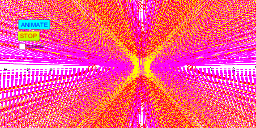
This GeoGebra example interactively demonstrates the properties of a hyperbola, allowing users to explore how parameters a and b affect its shape and eccentricity. The construction includes sliders, buttons, and coordinate axes, and integrates integral calculus with geometric visualization. It also connects hyperbola to normal distribution and conditional probability concepts, making it suitable for high school or early university students studying analytic geometry and calculus.
GeoGebra Commands & Parameters
Numeric a(-2.0)Numeric b(1.5)x^(2) / a^(2) - y^(2) / b^(2) = 1(a * x^(2)) + (b * y^(2)) = a^(2) + b^(2)(a * x^(2)) - (b * y^(2)) - a - b = 0Boolean f(false)
AI Drawing Prompt Reference
Draw a hyperbola with two sliders controlling parameters a and b to show how they affect the hyperbola's shape and eccentricity, including coordinate axes and integral curves related to the normal distribution and conditional probability, suitable for high school or early university students studying analytic geometry and calculus.
The prompt above was compiled from the original drawing commands and is for reference only.