
Interactive Exploration of Distance Between Two Points
Loading the math board and drawing, please wait…
In collections
Equations of a Straight Line
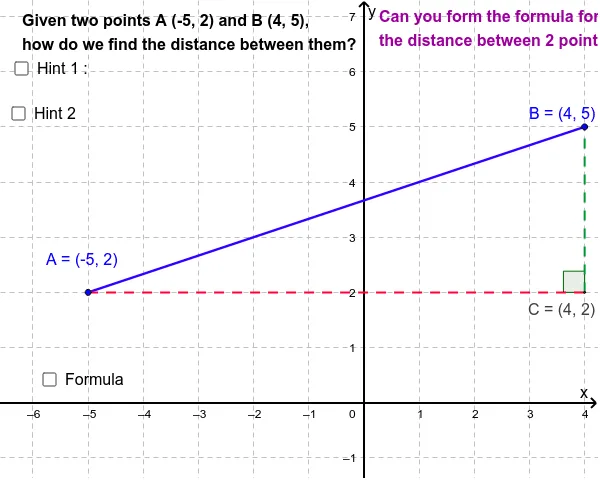
This GeoGebra applet lets you drag two points in the Cartesian plane and instantly visualizes the segment connecting them while displaying its length. It demonstrates the distance formula derived from the Pythagorean theorem, introduces the concept of vector magnitude, and shows how auxiliary constructions such as lines, intersections, angles, and midpoints are created using GeoGebra commands (Segment, Line, Intersect, Angle, Midpoint). The worksheet includes objects A, B, the segment a, angle α, and other labels to make the construction clear. Ideal for middle and high school math lessons, it serves both as a classroom demonstration tool and a student activity for hands‑on exploration of coordinate geometry.
GeoGebra Commands & Parameters
Segment(A, B) → aLine(B, yAxis) → bLine(A, xAxis) → cIntersect(b, c) → CSegment(A, C) → dSegment(C, B) → eAngle(B, C, A) → αMidpoint(d) → DMidpoint(e) → E
AI Drawing Prompt Reference
Draw two points A and B in a Cartesian coordinate system and connect them with a line segment a. The length of a changes as A and B move. Also draw lines through B and A, intersecting at point C. Then draw segments from A to C and from C to B, labeled d and e. Additionally, draw angle α and the midpoints D and E of segments d and e to illustrate distance formulas and vector concepts.
The prompt above was compiled from the original drawing commands and is for reference only.