
Integrating Odd Powers of the Sine Function
Loading the math board and drawing, please wait…
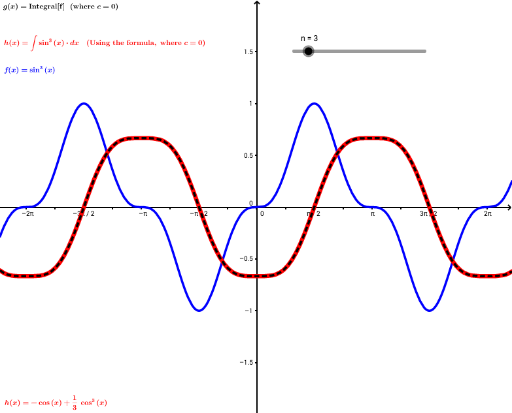
①This example demonstrates how to integrate odd powers of the sine function and dynamically visualize the integration process using GeoGebra. ②Core mathematical concepts include indefinite and definite integration, substitution methods, and trigonometric identities for simplifying odd powers of sine. ③The GeoGebra construction uses objects such as n (an integer slider controlling the power), f (the sine function definition), h and g (auxiliary functions or expressions), text1‑4 (displaying integration steps and results), and c_1 (a chart or curve object). These objects allow users to adjust n dynamically, observe changes in the integral expression, and view the graphical results in real time. ④Suitable for high‑school and university students, especially in first‑year calculus courses covering trigonometric integration. It can serve as a classroom demonstration or self‑study tool to deepen understanding of the derivation and geometric meaning of integrating odd powers of sine.
GeoGebra Commands & Parameters
Numeric n(3)f(x) = sin(x)^(n)Function hFunction gNumeric c_1(0)
AI Drawing Prompt Reference
Create a graph of the indefinite integral of an odd power of the sine function, dynamically adjusting the power with a slider and displaying changes in the integral expression. First, define an integer slider n for the power; then define function f as sin(x) to the power of n; next, construct auxiliary functions h and g to simplify the integration process; finally, display the integration steps and results, and plot the integral curve.
The prompt above was compiled from the original drawing commands and is for reference only.