
Integrated Study of ODEs with Numerical Solutions and Geometric Visualization
Loading the math board and drawing, please wait…
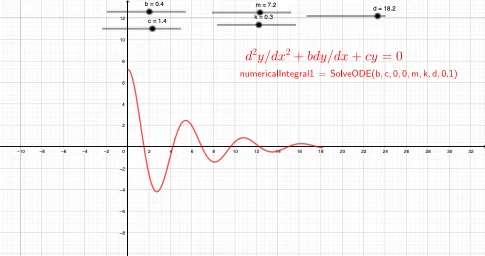
This GeoGebra example demonstrates how numerical solutions of an ordinary differential equation (ODE) can be visualized and studied in a geometric setting, clarifying the relationship between an equation model and the shape of the resulting solution (curve/surface behavior). The key mathematical ideas include ODE modeling, parameterized coefficients (e.g., m, k, b, c, d) and their influence on solution dynamics, numerical integration as a computational tool, and the geometric interpretation of integral quantities. Construction highlights from the provided summary: the SolveODE command is used to compute the ODE solution; LaTeX is applied to typeset and present the governing expressions or results; numericalIntegral1 captures an integral-based quantity for evaluation/validation; and text1/text2 are used to display important computed information directly on the diagram. Suitable for advanced secondary-school learners, as well as undergraduate calculus and differential equations instruction, especially when teaching numerical methods and parameter sensitivity through visualization.
GeoGebra Commands & Parameters
SolveODE(b, c, 0, 0, m, k, d, 0.1) → numericalIntegral1LaTeX(numericalIntegral1, true, true) → text1
AI Drawing Prompt Reference
Create a single visualization that displays a geometric quantity derived from a numerical solution of an ordinary differential equation, using a computed value as the key visual annotation. First, perform the numerical integration/ODE-solving process using the parameters b, c, m, k, and d, with interval endpoints starting at 0 and using step/end setting 0.1, to obtain a representative numerical integral value. Then typeset and place that computed numerical result on the diagram as a prominent mathematical formula text, clearly linking the ODE model to the resulting quantity shown.
The prompt above was compiled from the original drawing commands and is for reference only.