
Integer Subtraction Quiz Generator with Feedback
Loading the math board and drawing, please wait…
In collections
Exercise For Addition and Subtraction of Integers
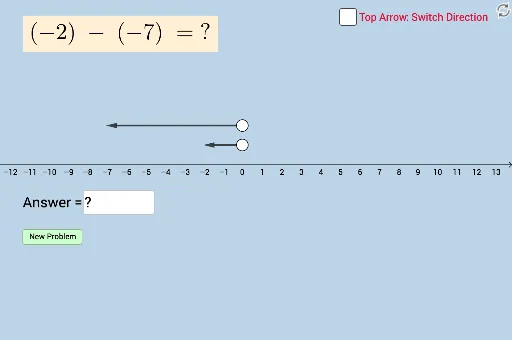
① This example demonstrates an interactive quiz that randomly generates integer subtraction problems and provides instant feedback. ② Core mathematical concepts include integer subtraction, random number generation, and answer‑checking logic. ③ Construction highlights: GeoGebra commands Point, Random, Vector, Textfield, Mirror are used to create objects f, g, A, B, a, b, C, D, u, v, button1, button2, c, InputBox1, text1, text2, d, D', w, enabling problem generation, input handling, and mirrored feedback display. ④ Suitable for middle‑school integer arithmetic practice, self‑study, and classroom formative assessment.
GeoGebra Commands & Parameters
Point(f) → APoint(g) → BRandom(-10, 10) → aRandom(-10, 10) → bVector(A, C) → uVector(B, D) → vTextfield(c) → InputBox1Mirror(D, x = x(B)) → D'Vector(B, D') → w
AI Drawing Prompt Reference
Create a diagram with two points placed on a plane. Draw a vector from the first point to a randomly generated point, and another vector from the second point to a different random point. On the right side of the second point, construct a mirrored copy of the first point and connect it with a vector. Add a text input field and a feedback text area below the points to allow users to enter answers and receive instant verification for integer subtraction problems. The layout should clearly show the original points, the generated vectors, the mirrored point, and the interactive input elements for a self‑checking quiz experience.
The prompt above was compiled from the original drawing commands and is for reference only.