
Interactive Quiz Generator for Adding Integers
Loading the math board and drawing, please wait…
In collections
Exercise For Addition and Subtraction of Integers
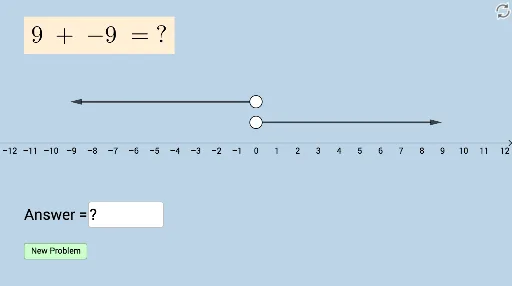
This GeoGebra example demonstrates an interactive quiz generator designed for practicing integer addition. It randomly generates addition questions and provides immediate feedback, helping students reinforce arithmetic skills. The core mathematical concepts involve integer addition and random number generation. Construction-wise, it utilizes GeoGebra commands such as Point for plotting points, Random for generating random numbers, Vector for creating vectors, and Textfield for displaying text and feedback. Objects include functions f and g, points A, B, a, b, C, D, vectors u, v, buttons, and input boxes, which together create a dynamic practice interface. This tool is suitable for middle school or upper elementary students, ideal for classroom drills or self-study to enhance calculation accuracy and speed.
GeoGebra Commands & Parameters
Point(f) → APoint(g) → BRandom(-10, 10) → aRandom(-10, 10) → bVector(A, C) → uVector(B, D) → vTextfield(c) → InputBox1
AI Drawing Prompt Reference
Design an interactive quiz interface for practicing integer addition: plot two function curves on a coordinate plane, randomly select a point on each curve, generate two random integers between -10 and 10, draw vectors from the selected points to corresponding target points to represent the addends, include a text input box for the learner to enter the sum, and add a button to refresh the problem and show immediate feedback.
The prompt above was compiled from the original drawing commands and is for reference only.