
Integer Operations Game: Random Practice with Instant Feedback
Loading the math board and drawing, please wait…
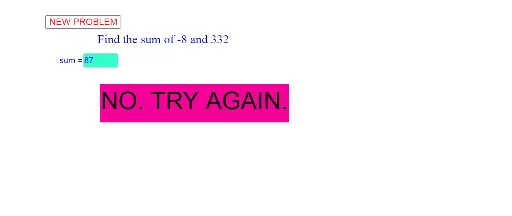
① This GeoGebra example is an interactive game for practicing integer arithmetic, where random problems are generated and users input answers to receive immediate feedback. ② The core mathematical concepts include integer operations (addition, subtraction, multiplication, division), random number generation, conditional logic, and user input handling; although the original tags mention geometric distribution, logarithmic functions, step functions, volume, and triangles, the actual activity focuses on integer arithmetic. ③ Construction details: The Random command generates random integers a and b; a Textfield and an input box (CasillaDeEntrada1) collect the user's answer; the If command evaluates correctness and updates feedback texts (texto1, texto2); a button (botón1) triggers new problem generation; objects include variables a, b, s, c. ④ This is suitable for upper elementary to middle school students for practicing integer operations, and can be used in classroom interactive teaching or self-study to enhance arithmetic fluency through gamified exercises.
GeoGebra Commands & Parameters
Random(-20, 20) → aRandom(0, 400) → bTextfield(c) → CasillaDeEntrada1If(c ≟ a + b, "CORRECT!", "NO. TRY AGAIN.") → texto2
AI Drawing Prompt Reference
Create an interactive integer arithmetic practice game interface. Show two randomly generated integers in the center, with an input box below for the user to type an answer. Next to it, display a feedback area that shows either 'CORRECT!' or 'NO. TRY AGAIN.' based on the input. At the top, include a button that generates a new pair of random integers when clicked. Use a clean, student-friendly design with a light background and clear, readable text.
The prompt above was compiled from the original drawing commands and is for reference only.