
Integer Multiplication Visualization
Loading the math board and drawing, please wait…
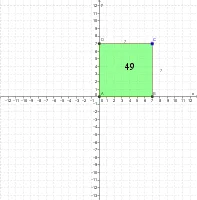
This example visualizes integer multiplication. The core mathematical concepts include the geometric representation of integer multiplication. Using commands from the construction summary, a vector-based model of integer multiplication is created. The model utilizes commands such as OrthogonalLine, Intersect, Polygon, Midpoint, and CircleArc. Suitable for middle school and above students to learn the geometric meaning of integer multiplication.
GeoGebra Commands & Parameters
OrthogonalLine(C, xAxis) → aOrthogonalLine(C, yAxis) → bIntersect(a, xAxis) → BIntersect(b, yAxis) → DIntersect(xAxis, yAxis) → APolygon(A, B, C, D) → poligon1, a_1, b_1, c, dMidpoint(A, C) → ECircleArc(E, A, D) → eCircleArc(E, D, A) → fPolygon(A, B, C, D) → poly1, a_2, b_2, c_1, d_1
AI Drawing Prompt Reference
Draw a geometric shape to visualize integer multiplication, start by drawing two perpendicular lines intersecting the x-axis and y-axis to get four intersection points, connect these four points to form a quadrilateral, then find the midpoint of AC and draw two arcs centered at this point, connecting AD and DA respectively, finally draw another quadrilateral with the same shape as the initial one to illustrate the geometric meaning of integer multiplication.
The prompt above was compiled from the original drawing commands and is for reference only.