
Integer Comparison and Ordering with Number Line
Loading the math board and drawing, please wait…
In collections
Negative Zahlen - Einführung
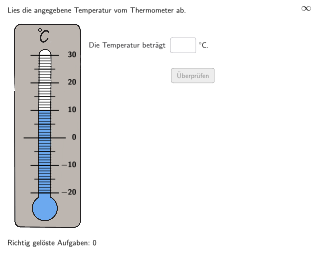
This example demonstrates how to use a number line and integer concepts to compare and order integers. The key mathematical concepts include integer comparison, number line representation, and the application of integers in real-world situations. Construction involves GeoGebra commands such as Join, Sequence, Element, and Textfield to create the number line and integer markers. Suitable for elementary students in grades 5-6 to reinforce integer comparison and ordering skills.
GeoGebra Commands & Parameters
Join({{10, -20, 5, -15, 22, -18, -4, 7, -8}, Sequence[RandomElement[TempList1], k, 1, 191]}) → RTList1Sequence(Random[1, 10], i, 1, 10) → randomNumbers, {7, 3, 3, 6, 1, 6, 6, 3, 6, 2}Element(randomNumbers, Mod[questionCount, Length[randomNumbers]] + 1) → randomNumberTextfield(input2) → InputBox2If(Case ≟ 1, PosImg11 + (4.25, 1.5), (8.75, 7.5)) → PosFBTextIf(Case ≟ 1, (6, -2.125), (8.75, 7)) → PosBtnValidateDefined(input2) → clickableBtnValidateSequence(Segment[PosA + (-0.34, (k * 1.5 / 10)), PosA + (0.34, (1.5 * k / 10))], k, 0, 50) → seg3Sequence(Segment[PosA + (-0.55, (k * 1.5) + (1.5 * 0.5)), PosA + (0.55, (1.5 * k) + (1.5 * 0.5))], k, 0, 4) → seg2Segment(PosA + (-0.75, (10 * 1.5 / 10)), PosA + (0.75, (1.5 * 10 / 10))) → segHint10Join({Sequence[Segment[PosA + (-0.75, (k * 1.5)), PosA + (0.75, (1.5 * k))], k, 0, 1], Sequence[Segment[PosA + (-0.75, (k * 1.5)), PosA + (0.75, (1.5 * k))], k, 3, 5]}) → seg1Segment(PosA + (-1.125, (20 * 1.5 / 10)), PosA + (1.125, (1.5 * 20 / 10))) → segHint0Text((If[showHintTypical ∧ -10 < temp2 < 0, "\textcolor{#DB6114}", "\textcolor{#000000}"] * "{\textsf{\bold{\phantom{−1}0}}}"), PosA + (1.3, (2 * 1.5) + 0.07), false, true, 0, 0) → CapT0Text((If[showHintTypical ∧ -20 < temp2 < -10, "\textcolor{#DB6114}", "\textcolor{#000000}"] * "{\textsf{\bold{−10}}}"), PosA + (1.3, (1 * 1.5) + 0.07), false, true, 0, 0) → CapTM10
AI Drawing Prompt Reference
Draw an integer number line on a coordinate background and include integer tick marks and labels. Place several short vertical tick segments along the line at evenly spaced positions, and add nearby text labels for negative integers, including −10 and −20, rendered with bold italic styling. Ensure the label text sits beside the corresponding ticks according to the number line scale, with negative values positioned on the left side. Reserve space in the composition for an input box and a validate button to support an integer comparison and ordering exercise.
The prompt above was compiled from the original drawing commands and is for reference only.