
Inequality-Constrained Triangle Centroid and Linear Programming Example
Loading the math board and drawing, please wait…
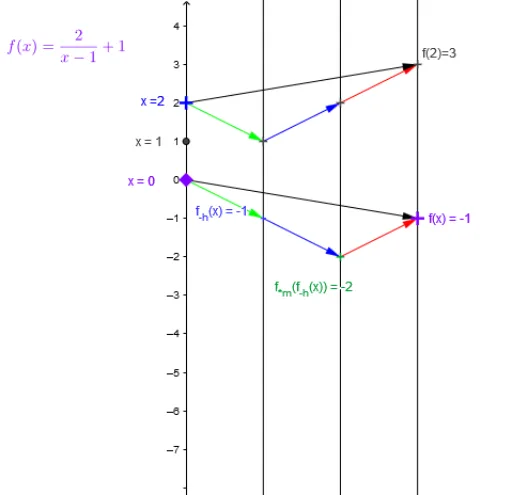
This interactive GeoGebra example demonstrates a dynamic construction that combines inequalities, the centroid (barycenter) of a triangle, and linear programming concepts. It visualizes how the centroid's coordinates change as triangle vertices move within a feasible region defined by linear inequalities, while also incorporating logarithmic functions and optimization tools to explore optimal solutions. Core mathematical concepts include: the triangle centroid (intersection of medians), feasible regions from systems of linear inequalities, optimization of linear objective functions (linear programming), and logarithmic functions as auxiliary constraints or transformations. Construction highlights: uses Point, Vector, and Segment commands to build triangle ABC and its sides; employs Textfield and InputBox for user-adjustable parameters; includes buttons (button1-4) and sliders for dynamic control; constructs auxiliary functions f, g, h and their composites (fg_x, hfg_x) to illustrate logarithmic and linear relationships; links centroid coordinates with objective functions to show optimization. Suitable for senior high school or early university students studying analytic geometry, linear programming, and geometric inequalities, as well as for dynamic exploration in mathematics lab courses.
GeoGebra Commands & Parameters
Point(yAxis) → A_xVector(A_x, B) → uVector(B, C) → vTextfield(f1) → inputBox1Textfield(f2) → inputBox2Vector(C, D) → wTextfield(f3) → inputBox3Textfield(A) → inputBox4_1Vector(A_x, D) → zSegment(Pole, Asym) → iVector(A_{xs}, A_{f(xs)}) → jSegment(P, hfg_x) → mVector(F, G) → pVector(G, H) → qVector(H, I) → rVector(F, I) → s