
Incircle Problem with Dynamic Illustration
Loading the math board and drawing, please wait…
In collections
Circles (Theorems)
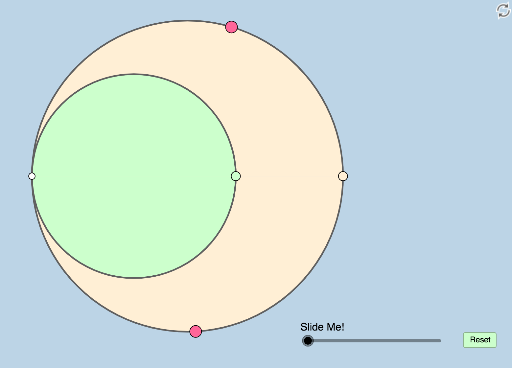
This is a dynamic and modifiable illustration of an incircle problem posted by Antonino Gutierrez on Twitter. The example demonstrates the geometric properties of an incircle, involving concepts such as circles, triangles, and reflections. Using GeoGebra commands like Circle, Semicircle, Point, Segment, etc., users can observe and understand the properties of the incircle dynamically. Suitable for middle school and above students and teachers.
GeoGebra Commands & Parameters
Circle(A_1, A) → cCircle(C_1, A) → dSemicircle(A, D_1) → eSemicircle(D_1, A) → fPoint(e) → D_2Segment(A, D_2) → gOrthogonalLine(D_2, h) → iIntersect(h, i) → EDistance(A, g) → distanceAgIntersect(e, j_1, 1) → ISemicircle(A, H) → c_1Circle(D_2, 2) → d_1Circle(D_2, 2) → r_1Segment(A, D_1) → b_1Mirror(cc, y = 0) → cc'Mirror(c_1, y = 0) → e_2Mirror(e, y = 0) → e'Mirror(ee, y = 0) → ee'Point(c) → BLine(D_2, B) → jIntersect(cc', j) → C, FIntersect(cc, j) → D,Segment(A, D_2) → kSegment(A, D) → lSegment(A, C) → nSegment(A, B) → pCircle(A, (0.3 * Min[{p, n, l, k}])) → qIntersect(q, p, 1) → GIntersect(q, n, 1) → JCircleSector(A, G, J) → rDilate(D_2, If[0 < m ≤ 1, 1 - m, 0], D) → KSegment(D_2, K) → sDilate(D, If[1 < m ≤ 2, 2 - m, 0], C) → D'Segment(D, D') → tDilate(C, If[2 < m ≤ 3, 3 - m, 0], B) → C'Segment(C, C') → f_1Dilate(A, If[3 < m ≤ 4, 4 - m, 0], B) → A'Dilate(A, If[3 < m ≤ 4, 4 - m, 0], D_2) → A'_1Segment(A, A'_1) → g_1Segment(A, A') → h_1Segment(A, J) → i_1Dilate(A, If[4 < m ≤ 5, 5 - m, 0], C) → A'_2Dilate(A, If[4 < m ≤ 5, 5 - m, 0], D) → A'_3Segment(A, A'_3) → k_1Segment(A, A'_2) → l_1Angle(C, A, D_2) → αRotate(r, If[5.5 < m ≤ 6.5, ((m - 5.5) * α), α], A) → r'
AI Drawing Prompt Reference
Draw a dynamic geometric illustration of an incircle problem. Include two circles and their intersections, a semicircle, and several points and line segments. Start by drawing two circles, then the semicircle and intersection points, connecting the points and segments. Next, draw perpendicular lines and intersection points, then multiple circles and segments. Finally, perform mirror operations and draw angles and rotated shapes to show the dynamic properties of the incircle.
The prompt above was compiled from the original drawing commands and is for reference only.