
Impact of Changes on Trapezoid Area
Loading the math board and drawing, please wait…
In collections
Trapez - Flächeninhalt
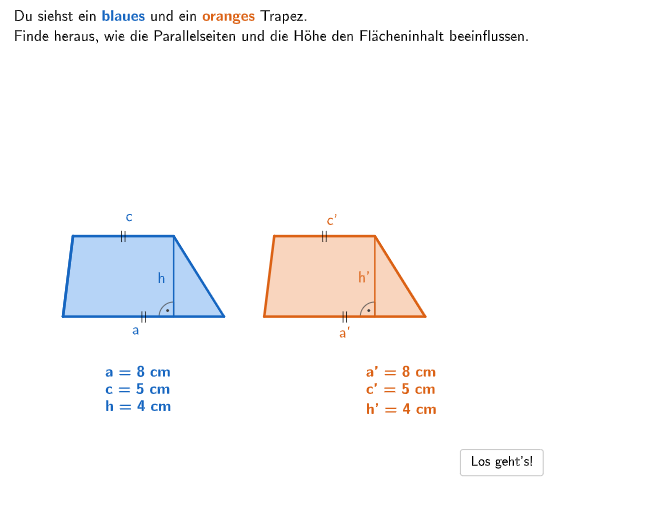
This example demonstrates the changes in trapezoid area when the lengths of the parallel sides and height change. Key mathematical concepts include the trapezoid area formula and its application. It uses GeoGebra commands such as Polygon, Segment, and Angle for geometric construction. Suitable for 5-6th grade students to learn and practice trapezoid area calculation and proof.
GeoGebra Commands & Parameters
Textfield(input1) → InputBox1Textfield(input2) → InputBox2SelectedIndex(dropDownH) → index2SelectedIndex(dropDownAC) → index1Sequence(Sequence[(IGotOptions(i) * IGotOptions(k)), i, 1, 4], k, 1, 4) → SolMatrix, {{0.25, 1, 0.125, 0.5}, {1, 4, 0.5, 2}, {0.125, 0.5, 0.0625, 0.25}, {0.5, 2, 0.25, 1}}Element(SolMatrix, matrixAC, matrixH) → matrixsolIf(matrixsol ≟ 1 / 16, 2, matrixsol ≟ 2, 7, matrixsol ≟ 4, 8, matrixsol ≟ 1 / 8, 3, matrixsol ≟ 1 / 4, 4, matrixsol ≟ 1 / 2, 5, matrixsol ≟ 1, 6) → solindexPolygon(PtopLeftCornerFeedback, PtopRightCornerFeedback, PbottomRightCornerFeedback, PbottomLeftCornerFeedback) → rectangleCorrect, rectangleCorrectS3, rectangleCorrectS4, rectangleCorrectS2, rectangleCorrectS1Shuffle(Sequence[Random[0, 10], i, 1, 100]) → randomNosForX, {8, 7, 0, 6, 7, 6, 5, 9, 5, 1, 2, 6, 9, 8, 0, 2, 9, 1, 6, 6, 5, 1, 3, 10, 10, 1, 0, 5, 3, 3, 7, 3, 1, 3, 5, 5, 0, 7, 0, 4, 9, 0, 5, 1, 7, 5, 4, 10, 0, 6, 8, 0, 3, 0, 1, 6, 4, 2, 3, 9, 0, 8, 10, 10, 5, 4, 1, 2, 3, 5, 7, 9, 0, 9, 8, 6, 9, 1, 4, 10, 1, 0, 6, 3, 6, 8, 3, 8, 10, 2, 9, 9, 7, 8, 7, 1, 0, 5, 0, 1}Element(randomNosForX, Mod[questionCount, 100] + 1) → numXShuffle(Sequence[Random[0, 10], i, 1, 100]) → randomNosForY, {0, 9, 5, 2, 3, 9, 5, 7, 1, 1, 3, 4, 9, 5, 4, 3, 7, 3, 0, 6, 9, 2, 1, 7, 10, 3, 3, 3, 0, 0, 0, 1, 6, 8, 10, 1, 1, 7, 0, 7, 0, 2, 5, 9, 5, 5, 6, 7, 4, 0, 10, 2, 6, 10, 3, 10, 0, 10, 9, 0, 7, 3, 8, 3, 0, 1, 0, 1, 5, 1, 7, 2, 2, 10, 1, 4, 10, 6, 4, 10, 3, 6, 8, 6, 6, 7, 9, 0, 3, 4, 3, 5, 3, 9, 3, 5, 4, 1, 0, 8}Element(randomNosForY, Mod[questionCount, 100] + 1) → numYAppend(true, Sequence[If[randomNosForX(i) ≟ randomNosForX(i - 1), false, true], i, 2, 100]) → stayXAppend(true, Sequence[If[randomNosForY(i) ≟ randomNosForY(i - 1), false, true], i, 2, 100]) → stayYRemove(Sequence[If[stayX(i), randomNosForX(i), 0], i, 1, 100], Sequence[0, i, 1, 100]) → randomNosForXwithoutRepeatRemove(Sequence[If[stayY(i), randomNosForY(i), 0], i, 1, 100], Sequence[0, i, 1, 100]) → randomNosForYwithoutRepeatElement(randomNosForXwithoutRepeat, Mod[questionCount, Length[randomNosForXwithoutRepeat]] + 1) → numXwithoutRepeatElement(randomNosForYwithoutRepeat, Mod[questionCount, Length[randomNosForYwithoutRepeat]] + 1) → numYwithoutRepeatSelectedIndex(dropDownResult) → index4Polygon(A, B, C, D) → q1, a, b, c, dOrthogonalLine(C, a) → gIntersect(g, a) → ESegment(C, E) → hIf(SelectedElement[dropDownH] ≟ dropDownH(1), lenH, SelectedElement[dropDownH] ≟ dropDownH(2), lenH / 2, SelectedElement[dropDownH] ≟ dropDownH(3), (lenH * 2), SelectedElement[dropDownH] ≟ dropDownH(4), lenH / 4, index2 ≟ 5, lenH) → lenHAdaptedIf(SelectedElement[dropDownAC] ≟ dropDownH(1), lenA, index1 ≟ 5, lenA, SelectedElement[dropDownAC] ≟ dropDownH(2), lenA / 2, SelectedElement[dropDownAC] ≟ dropDownH(3), (lenA * 2), SelectedElement[dropDownAC] ≟ dropDownH(4), lenA / 4, SelectedElement[dropDownAC] ≟ dropDownH(5), (lenA * 4)) → lenAAdaptedIf(SelectedElement[dropDownAC] ≟ dropDownH(1), lenC, index1 ≟ 5, lenC, SelectedElement[dropDownAC] ≟ dropDownH(2), lenC / 2, SelectedElement[dropDownAC] ≟ dropDownH(3), (lenC * 2), SelectedElement[dropDownAC] ≟ dropDownH(4), lenC / 4, SelectedElement[dropDownAC] ≟ dropDownH(5), (lenC * 4)) → lenCAdaptedPolygon(A1, B1, C1, D1) → q2, a1, b1, c1, d1OrthogonalLine(C1, a1) → iIntersect(i, a1) → FSegment(C1, F) → h_1PolyLine(A, D, C, B) → Trapez1ZugSegment(A, D) → jSegment(CoordSystem2, CoordSystem3) → kSegment(CoordSystem2, CoordSystem1) → lSequence(CoordSystem2 + ((i * 0.5), 0), i, 0, 28) → l1Sequence(Segment[l1(i), l1(i) + (0, 4.5)], i, 1, Length[l1]) → l2Sequence(CoordSystem2 + (0, (i * 0.5)), i, 0, 9) → l3Sequence(Segment[l3(i), l3(i) + (14, 0)], i, 1, Length[l3]) → l4Angle(C, E, A) → αAngle(C1, F, A1) → βSelectedIndex(DD) → index3Text("\textsf{||}", Midpoint[D, C] + (0, 0.05), false, true, 0, 0) → Text7Text("\textsf{||}", Midpoint[A, B] + (0, 0.05), false, true, 0, 0) → Text8Text("\textsf{||}", Midpoint[D1, C1] + (0, 0.05), false, true, 0, 0) → Text5Text("\textsf{||}", Midpoint[B1, A1] + (0, 0.05), false, true, 0, 0) → Text6Text(Text12, G, false, true, 0, 0) → Text14Text(Text13, H, false, true, 0, 0) → Text15Text(Text3, I, false, true, -1, 0) → Text17Text(Text4, J, false, true, 1, 0) → Text18
AI Drawing Prompt Reference
Draw a trapezoid to demonstrate how its area changes with the lengths of the parallel sides and the height. The parallel sides and height of the trapezoid can be adjusted, with different colors and labels used to indicate them. Below the trapezoid, draw a coordinate system and plot a function graph showing the change in trapezoid area with varying parallel side lengths and heights. Label the values of the parallel side lengths and height next to the trapezoid and the values on the function graph in the coordinate system.
The prompt above was compiled from the original drawing commands and is for reference only.