
IM Alg2.2.6 Lesson: Different Forms
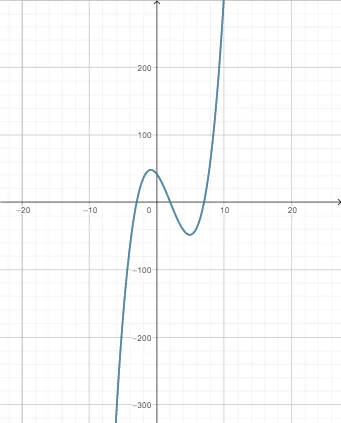
Loading the math board and drawing, please wait…
This GeoGebra example accompanies Lesson 2.6 of Illustrative Mathematics Algebra 2, demonstrating how the same mathematical relationship can be represented in different forms (e.g., symbolic, graphical, tabular) and how to convert between these representations. Core concepts include various forms of functions (such as piecewise functions), conditional probability, the unit circle, random experiments, and bar charts for data visualization. The construction uses objects f, a, and h, where f likely denotes a function expression, and a and h may serve as parameters or sliders to dynamically adjust the function's form or observe parameter effects on the graph. This resource is suitable for high school Algebra 2 students, useful for classroom instruction or independent exploration, reinforcing flexible use of function representations and laying groundwork for probability and trigonometry.
GeoGebra Commands & Parameters
f(x) = (((x - 2) * (x + 3)) * (x - 7))Numeric a(1)h(x) = (((a * (x - 2)) * (x + 3)) * (x - 7))
AI Drawing Prompt Reference
Draw a function graph with the expression f(x) = (x - 2)(x + 3)(x - 7), and create a parameter a so that the new function h(x) = a(x - 2)(x + 3)(x - 7) can be dynamically adjusted by changing the value of a. First, draw f(x), then create a slider a, and finally adjust the graph of h(x) based on the value of a.
The prompt above was compiled from the original drawing commands and is for reference only.