
IM Alg1.3.8 Lesson: Using the Correlation Coefficient
Loading the math board and drawing, please wait…
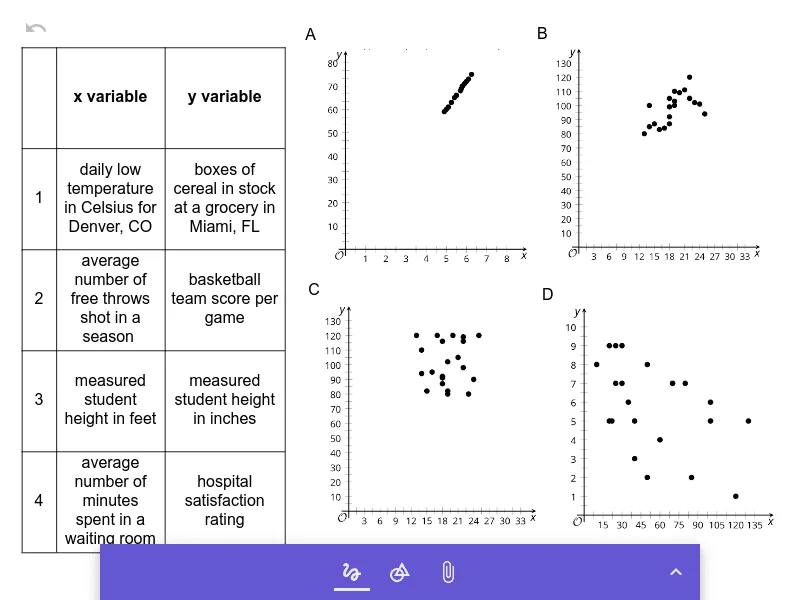
This GeoGebra example is part of the Illustrative Mathematics Algebra 1 curriculum, Unit 3, Lesson 8, focusing on using the correlation coefficient to quantify the strength and direction of a linear relationship between two variables. It presents multiple image objects (pic1 through pic4) that likely display scatter plots or data distributions, along with numeric objects a, b, c, d, e that may serve as adjustable parameters or computed values. The core mathematical concepts include linear correlation, scatter plots, best-fit lines, and interpretation of correlation coefficients (r values). The construction uses GeoGebra's image insertion feature to embed static or dynamic data visuals, and numeric sliders or values to manipulate examples, allowing learners to see how different data patterns correspond to r values near 1, -1, or 0. This resource is suitable for upper middle school or high school students studying statistics and data analysis, and can be used for classroom instruction or independent exploration to reinforce that correlation does not imply causation but measures linear association.
GeoGebra Commands & Parameters
Table aInlinetext bInlinetext cInlinetext dInlinetext e
AI Drawing Prompt Reference
Display four scatter plots, each with differently colored data points and a best-fit line, adjust parameter a using a slider to observe changes in the scatter plots and corresponding correlation coefficients r values ranging from near 1 to near -1, label each plot with its r value and best-fit line equation, illustrating the strength and direction of linear correlation.
The prompt above was compiled from the original drawing commands and is for reference only.