
IM 8.1.13 Practice: Congruence
Loading the math board and drawing, please wait…
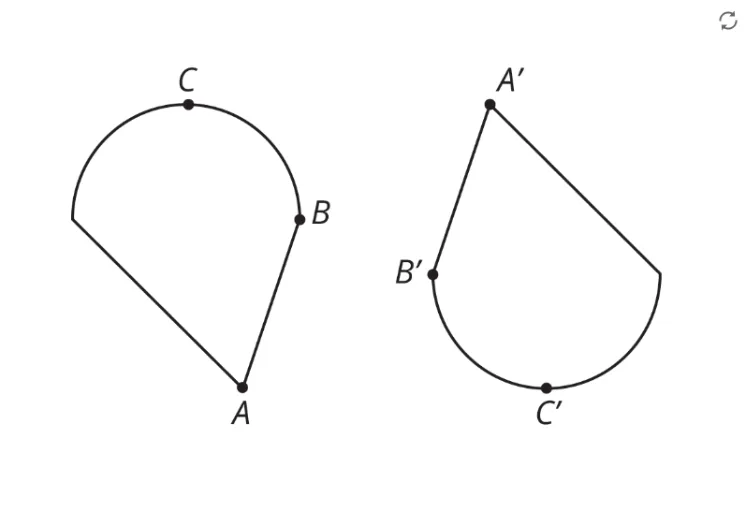
This example demonstrates the concept of congruent figures, using two geometric objects A and B along with an image pic1 to visually show that figures with identical shape and size remain congruent under translations, rotations, or reflections. The core mathematical concept is congruence, involving equal corresponding sides, equal corresponding angles, and invariance under transformations. Construction highlights: GeoGebra commands create points A and B as key vertices and insert image pic1 as a background or reference, allowing learners to compare positions and dimensions to understand congruence. Suitable for 8th-grade students studying congruence properties, this practice is ideal for classroom exercises or homework to reinforce understanding of congruence criteria and properties.
GeoGebra Commands & Parameters
Point A(-11.511106676933101, -0.38431922340979696)Point B(1.6474868937933498, -0.38431922340979696)
AI Drawing Prompt Reference
Draw two congruent polygons, with one as a background image. Start by placing a point A at coordinates (-11.51, -0.38), then place another point B at (1.65, -0.38). These points are key vertices of the polygons, and through translation, rotation, or reflection, the shapes can remain congruent, demonstrating the concept of congruence.
The prompt above was compiled from the original drawing commands and is for reference only.