
Hypotenuse Leg Congruence Investigation
Loading the math board and drawing, please wait…
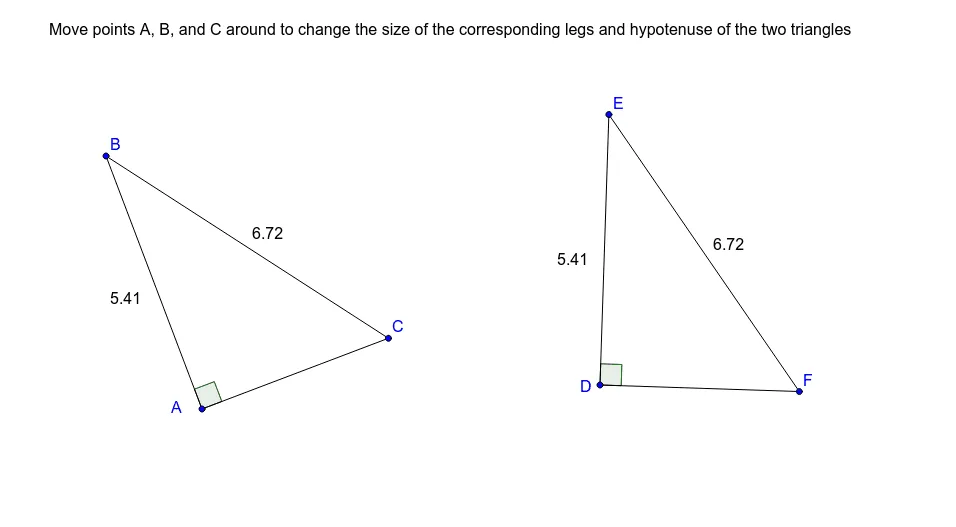
This GeoGebra example dynamically demonstrates the Hypotenuse-Leg (HL) congruence theorem for right triangles. It constructs two right triangles with draggable points that alter the lengths of the hypotenuse and one leg, visually showing that if the hypotenuse and one corresponding leg are equal, the two right triangles are congruent. The core mathematical concepts include triangle congruence criteria, properties of right triangles, the Pythagorean theorem, and geometric reasoning. The construction uses GeoGebra commands such as Segment, OrthogonalLine, Point, Angle, Circle, and Intersect to build the triangles and their corresponding sides, with angle markers (α, β) and text (text1) to aid observation. This is suitable for middle school geometry classes, for exploring congruence conditions, verifying the HL theorem, and as a dynamic teaching aid to help students understand the logic of geometric proofs.
GeoGebra Commands & Parameters
Segment(A, B) → aOrthogonalLine(A, a) → bPoint(b) → CSegment(B, C) → cSegment(A, C) → dAngle(C, A, B) → αCircle(D, a) → ePoint(e) → ESegment(E, D) → fOrthogonalLine(D, f) → gCircle(E, c) → hIntersect(h, g, 2) → FSegment(E, F) → iSegment(F, D) → jAngle(F, D, E) → β
AI Drawing Prompt Reference
Draw two draggable right triangles to demonstrate that if the hypotenuse and one leg are equal, the triangles are congruent. Dynamically show the hypotenuse and one leg, label angles α and β, and use circles and intersections to aid in proving the HL congruence theorem, suitable for geometry education.
The prompt above was compiled from the original drawing commands and is for reference only.