
Hyperbola Intersection Demo
Loading the math board and drawing, please wait…
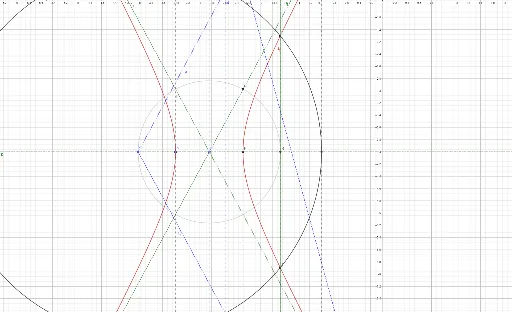
This example demonstrates the formation process of a hyperbola and its intersection with a circle. Key math concepts include hyperbola definition, coordinate geometry, and geometric construction. GeoGebra commands/objects used are Circle, Line, Intersect, OrthogonalLine, Point, Segment, Ray, LineBisector, and Hyperbola. Suitable for high school students learning about hyperbola properties and graphs.
GeoGebra Commands & Parameters
Circle(S1, K) → cLine(S1, xAxis) → fIntersect(c, f, 1) → COrthogonalLine(C, xAxis) → gIntersect(c, f, 2) → DOrthogonalLine(D, xAxis) → hOrthogonalLine(S1, xAxis) → vPoint(v) → AIntersect(g, xAxis) → B_1Segment(B_1, A) → iIntersect(h, xAxis) → ESegment(B_1, E) → jSegment(E, A) → kIntersect(v, j) → S2Point(xAxis) → FRay(F, G) → lOrthogonalLine(F, xAxis) → mPoint(m) → HRay(F, H) → nOrthogonalLine(S1, n) → pIntersect(c, m, 2) → IIntersect(c, m, 1) → JIntersect(k, l) → LOrthogonalLine(L, j) → qIntersect(p, q) → BLine(A, l) → rRay(B_1, A) → sRay(E, A) → tIntersect(l, s) → MOrthogonalLine(M, j) → aIntersect(p, a) → NLineBisector(N, B) → bIntersect(p, b) → OOrthogonalLine(Intersect[j, r], j) → dIntersect(c, d, 2) → PSegment(S1, P) → eIntersect(c, d, 1) → QSegment(S1, Q) → f_1Line(O, e) → g_1Line(O, f_1) → h_1Intersect(q, g_1) → RCircle(O, R) → c_1Intersect(c_1, f, 2) → SHyperbola(S1, S, B) → d_1
AI Drawing Prompt Reference
Draw a circle intersecting the x-axis at two points. From each intersection, draw a tangent line to the circle. Then, draw perpendicular lines from these points to the x-axis, creating two additional intersection points. Connect the center of the circle to these points to form the vertices of a hyperbola. Draw the hyperbola branches using the vertices and the intersections of the tangent lines with the x-axis. Finally, connect the intersections of the hyperbola and the circle to complete the diagram.
The prompt above was compiled from the original drawing commands and is for reference only.