
Hyperbola Exploration by LoliKnight454
Loading the math board and drawing, please wait…
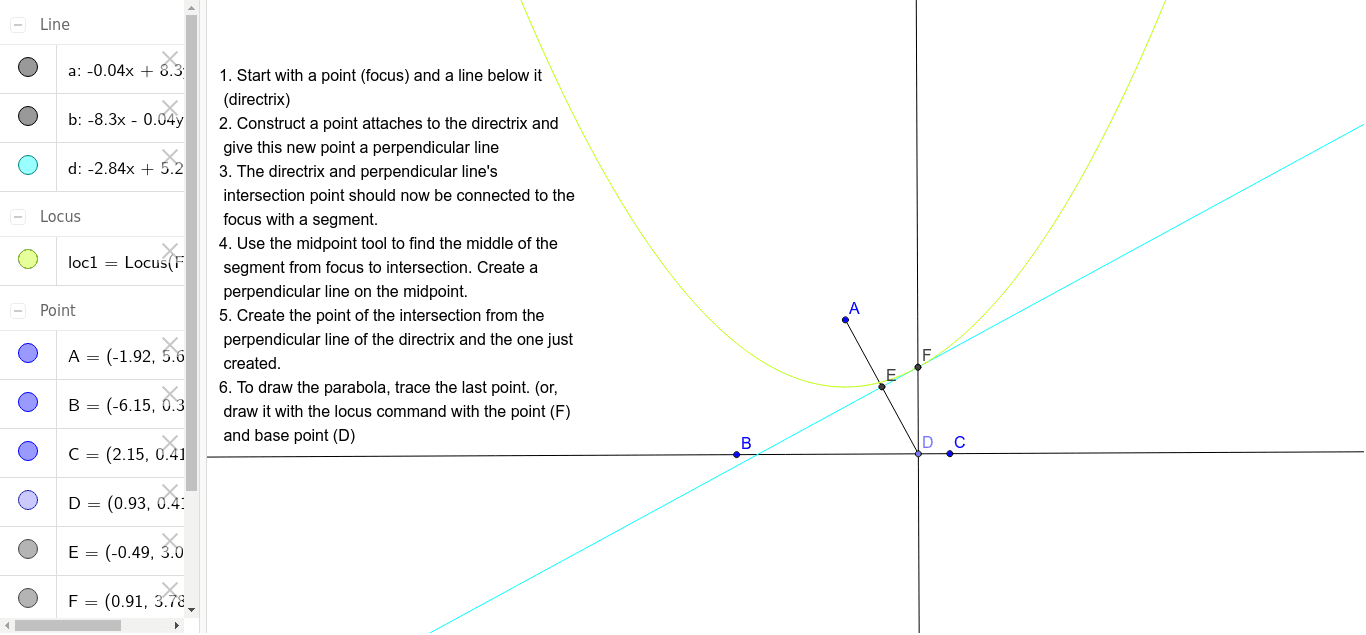
This example demonstrates the geometric properties of hyperbolas. It involves the definition and properties of hyperbolas and how to construct them using GeoGebra. By using commands such as Line, Point, OrthogonalLine, Segment, Midpoint, Intersect, and Locus, one can understand how to draw hyperbolas and related elements in GeoGebra. Suitable for high school mathematics education and learning.
GeoGebra Commands & Parameters
Line(B, C) → aPoint(a) → DOrthogonalLine(D, a) → bSegment(A, D) → cMidpoint(c) → EOrthogonalLine(E, c) → dIntersect(b, d) → FLocus(F, D) → loc1
AI Drawing Prompt Reference
Draw a hyperbola by first creating a line, then taking a point on it, and drawing a perpendicular line through this point. Connect one endpoint of the line to the point on the perpendicular, find the midpoint of this segment, and draw a perpendicular line through the midpoint. Finally, locate the intersection of this perpendicular with the previous one, and trace the path of this intersection as the endpoint moves, forming a hyperbola.
The prompt above was compiled from the original drawing commands and is for reference only.