
Hyperbola Construction: Geometric Locus with Foci
Loading the math board and drawing, please wait…
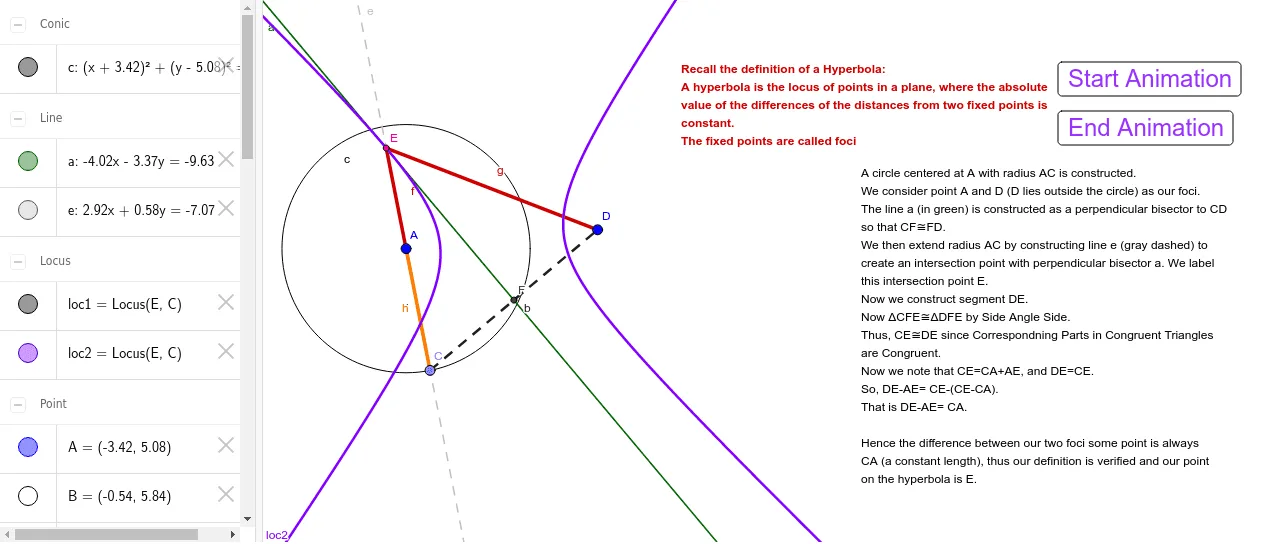
This GeoGebra example demonstrates how to construct a hyperbola using geometric tools, visualizing the locus of points where the absolute difference of distances to two fixed foci is constant. The core mathematical concept is the definition of a hyperbola as a conic section. The construction uses commands such as Circle, Point, LineBisector, Segment, Line, Intersect, and Locus, with objects including points A, B, C, D, E, F, lines a, b, d, e, f, g, circles c, loci loc1 and loc2, and interactive buttons (button1, button2) with text labels. It is suitable for high school analytic geometry or introductory college conic sections, helping students grasp the geometric construction and dynamic nature of hyperbolas.
GeoGebra Commands & Parameters
Circle(A, B) → cPoint(c) → CLineBisector(C, D) → aSegment(C, D) → bSegment(A, C) → dLine(A, C) → eIntersect(a, e) → ELocus(E, C) → loc1Segment(A, E) → fSegment(D, E) → gLocus(E, C) → loc2Segment(A, C) → hIntersect(a, b) → F
AI Drawing Prompt Reference
Create a geometric construction illustration of a hyperbola defined by a locus condition relative to two fixed foci. Start by drawing circles constructed from the given two reference points, then construct a line related to the perpendicular bisector of the relevant segment and find its intersection with a constructed line to obtain a key moving point. Using this moving point, construct the locus curves that represent points where the absolute difference of distances to the two fixed foci is constant, yielding two symmetric branches. Include auxiliary segments, intersection points, and guiding lines so the relationship between the fixed foci and the two loci is visually clear.
The prompt above was compiled from the original drawing commands and is for reference only.