
Horizontal Hyperbola Exploration
Loading the math board and drawing, please wait…
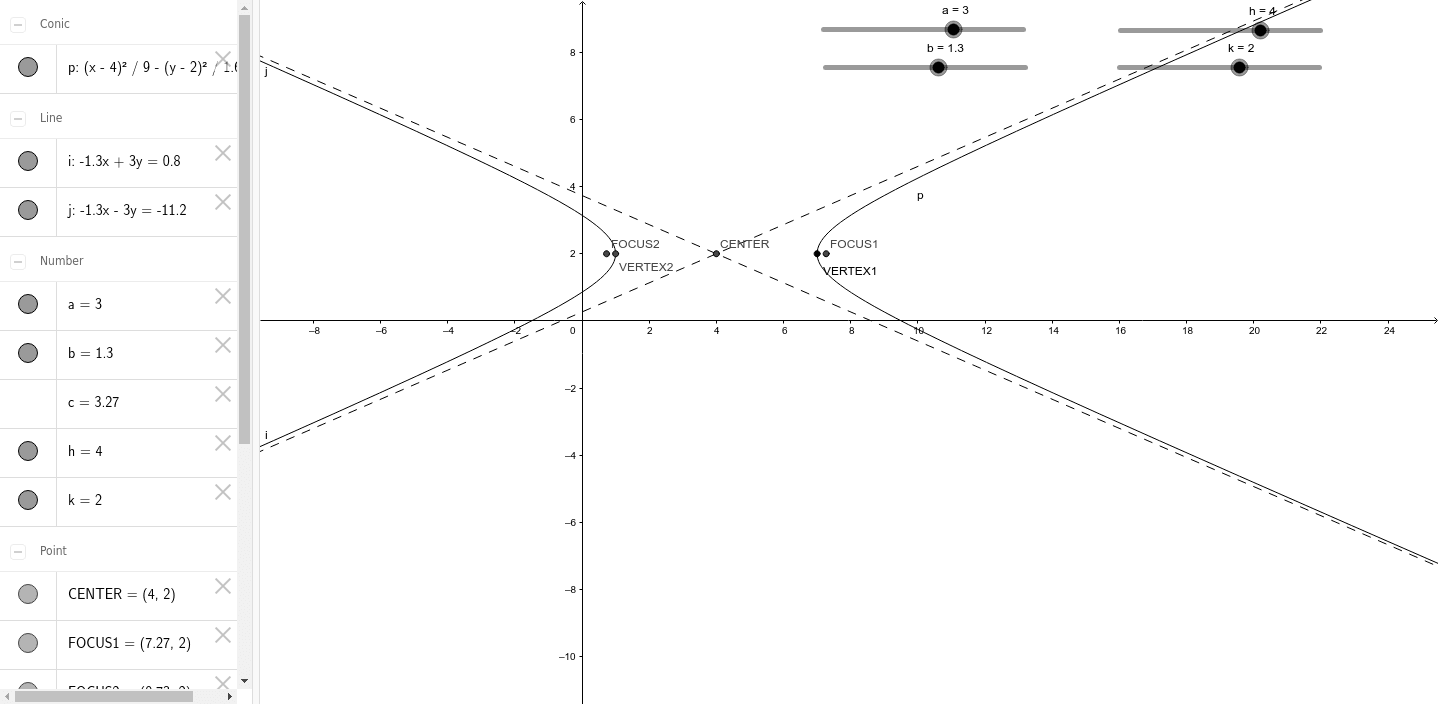
This example demonstrates the geometric properties and parameter variations of a horizontal hyperbola. Key math concepts include hyperbola definition, asymptotes, foci, vertices, and eccentricity. It is constructed using GeoGebra commands like Segment, Line, and Hyperbola, manipulating objects such as a, b, c, h, k, CENTER, A, B, C, D, d, e, f, g, i, j, VERTEX1, VERTEX2, FOCUS1, FOCUS2, p. Suitable for high school and above students to understand hyperbola characteristics and parameter effects.
GeoGebra Commands & Parameters
Segment(B, A) → dSegment(D, A) → eSegment(C, D) → fSegment(C, B) → gLine(CENTER, A) → iLine(D, CENTER) → jHyperbola(FOCUS2, FOCUS1, VERTEX1) → p
AI Drawing Prompt Reference
Draw a horizontal hyperbola and adjust its shape and position by changing the values of a and b. First, draw the center point, then draw the two asymptotes, followed by the vertices and foci of the hyperbola, and finally, use these points to draw the hyperbola.
The prompt above was compiled from the original drawing commands and is for reference only.