
Hyperbola Definition Explorer
Loading the math board and drawing, please wait…
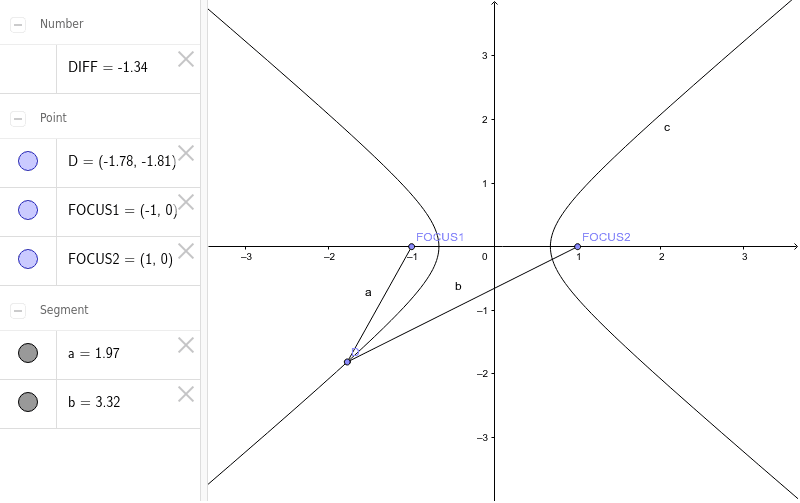
This example demonstrates the definition and geometric properties of a hyperbola. By dragging the foci and vertices, it visually illustrates key concepts such as the foci, real axis, and imaginary axis. Construction highlights: Uses Point command to create foci and vertices, Segment command to form basic elements, involving objects like FOCUS1, FOCUS2, center C, real axis length c, hyperbola parameter D, real axis a, imaginary axis b, and difference DIFF. Suitable for high school coordinate geometry teaching, helping students understand the generation process and basic properties of hyperbolas.
GeoGebra Commands & Parameters
Point(xAxis) → FOCUS1Point(xAxis) → FOCUS2Hyperbola(FOCUS1, FOCUS2, C) → cPoint(c) → DSegment(FOCUS1, D) → aSegment(FOCUS2, D) → b
AI Drawing Prompt Reference
Draw a hyperbola and use the foci and vertices to illustrate its key features, such as the foci, real axis, and imaginary axis. Start by creating two foci on the x-axis, then use these foci and a center point to create the hyperbola. Next, create a point D on the hyperbola and draw the lengths of the real and imaginary axes using the foci and point D.
The prompt above was compiled from the original drawing commands and is for reference only.