
HL Triangle Congruence Construction Activity by Jay Lietzow
Loading the math board and drawing, please wait…
In collections
Triangle Congruence
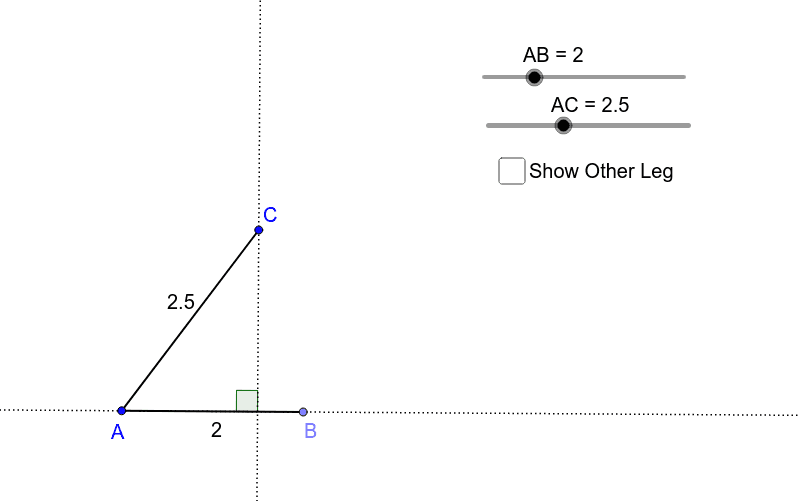
This example demonstrates how to construct right triangles given the length of a leg and hypotenuse, focusing on the HL Congruence Theorem. It involves core math concepts like right triangle construction, geometric drawing, and the HL theorem. Key GeoGebra commands/objects used include Point, Segment, Angle, Rotate, OrthogonalLine, Line, and Intersect. Suitable for high school students to understand the application of the HL theorem and geometric construction techniques.
GeoGebra Commands & Parameters
Point(Circle[A, abs(AB)]) → BSegment(A, B) → b_1Point(Circle[A, abs(AC)]) → CSegment(A, C) → a_1Angle(B, A, C) → βSegment(C, B) → aRotate(A, -90*°, B) → A'_1OrthogonalLine(C, b_1) → cLine(A, B) → bIntersect(b, c) → DAngle(C, D, A) → α
AI Drawing Prompt Reference
Draw a right triangle given the length of one leg and the hypotenuse to demonstrate the HL Congruence Theorem. Start by drawing a circle centered at A with the leg length as the radius, intersecting the circle at point B. Then draw another circle centered at A with the hypotenuse length as the radius, intersecting at point C. Connect points A, B, and C to form the triangle. Rotate line segment AC 90 degrees counterclockwise around point B to get A'. Connect C to A'. Draw a line perpendicular to AB through C, intersecting A'B at point D. Label angle CAD to illustrate the HL congruence construction.
The prompt above was compiled from the original drawing commands and is for reference only.