
HKDSE Sample Paper I #18: Triangle and Trigonometry Construction Example
Loading the math board and drawing, please wait…
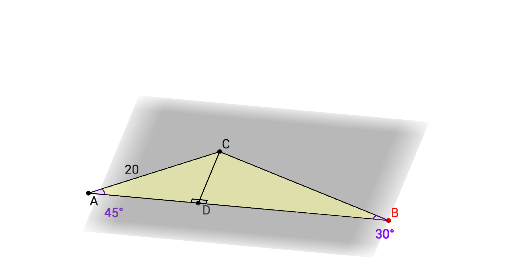
This example demonstrates how to use GeoGebra to draw an isosceles triangle and calculate its trigonometric values. Key mathematical concepts include triangle properties, trigonometric function definitions, and construction techniques. The construction involves using commands like Angle, Rotate, Polygon, and Segment to create the triangle, with Point objects determining vertex positions. Suitable for high school students learning basic applications of geometry and trigonometry, useful for HKDSE preparation.
GeoGebra Commands & Parameters
Angle(D, A, C) → αAngle(C, B, D) → βRotate(B, (-theta), yAxis) → B'Polygon(A, C, D) → poly1, a, b, cPolygon(D, B', C) → poly2, c_1, d, b'Angle(B', D, C) → γAngle(C, D, A, space) → δAngle(B', D, A) → εSegment(B', A) → ePolygon(C, D, B) → poly3, b_1, c_2, d_1Angle(D, B', C) → ζ
AI Drawing Prompt Reference
Draw an isosceles triangle and label its base angles and vertex angle. Rotate one of the base vertices to construct another triangle, labeling all sides and angles of the triangles. Finally, connect the rotated vertex to the original vertex, labeling the connecting segment and the sides and angles of the new triangle.
The prompt above was compiled from the original drawing commands and is for reference only.