
Height and Volume: Dynamic Filling Experiment for Cylinder Volume
Loading the math board and drawing, please wait…
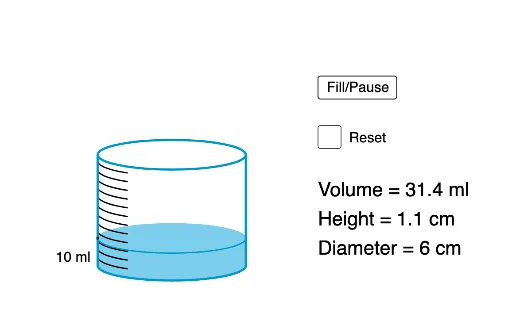
This GeoGebra example demonstrates the relationship between the height and volume of a cylinder through an interactive filling animation. It visualizes how the volume changes as the liquid level rises, highlighting the linear dependence of volume on height for a fixed base area. Core mathematical concepts include volume formulas, proportional reasoning, function graphing, and optimization (finding maximum volume). The construction uses sliders (h, r, Vmax, Vrate) to adjust cylinder dimensions and filling speed, polygons (poly1, poly2) to represent cross-sections, translation (Translate) and sequence (Sequence) commands to animate the filling process, and text input boxes (InputBox1, InputBox2) for interactive parameter control. Functions (f, g) and intersection points (Intersect) are used to plot and analyze the volume-height curve. Suitable for middle school to high school students learning solid geometry, functions, and optimization, as well as for teachers demonstrating real-world applications of volume calculations.
GeoGebra Commands & Parameters
If(Vmax > 49, (round(Vmax / 100) * 10), 5) → untPolygon((r, 0), (r, h), ((-r), h), ((-r), 0)) → poly1, f, g, i, jPolygon((r, 0), (r, fillh), ((-r), fillh), ((-r), 0)) → poly2, k, l, m, nPoint(Ray[(0, 0), (1, 0)]) → RPoint(Ray[(0, 0), (0, 1)]) → HTranslate(c, (0, fillh)) → c'Translate(c, (0, h)) → c'_1Sequence(If[(-r) ≤ x ≤ (-0.6 * r), q(x) + (i * unth)], i, 1, untn) → list3Textfield(h) → InputBox1Textfield(r) → InputBox2Ray((0, fillh), (0, fillh + 0.1)) → eLine(A, xAxis) → f_1Intersect(f_1, i) → B
AI Drawing Prompt Reference
Draw a cylinder with an animation showing the liquid filling process to illustrate the relationship between height and volume. Use sliders to adjust the cylinder's height and radius, and represent the filled cross-sections with different colored polygons. Plot the function graph showing volume versus height, marking key points like the top of the cross-section and the center of the base. Animate the liquid filling from the bottom upwards, and display the calculation for the maximum volume.
The prompt above was compiled from the original drawing commands and is for reference only.