
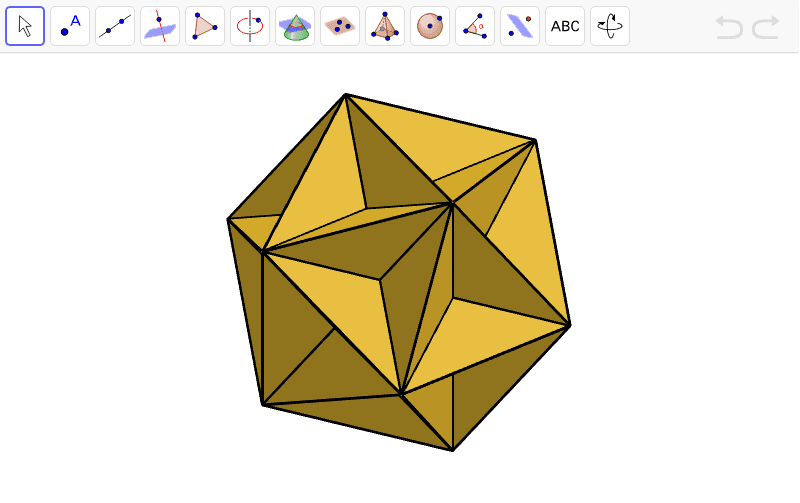
Great Dodecahedron: Constructing a Kepler-Poinsot Polyhedron
Loading the math board and drawing, please wait…
In collections
My 3D Collection
This example demonstrates how to construct the Great Dodecahedron, a non-convex regular star polyhedron belonging to the Kepler-Poinsot family, using GeoGebra's 3D capabilities. The core mathematical concepts include regular polyhedra, star polyhedra, Euler's formula, and the relationships among vertices, edges, and faces in three-dimensional geometry. The construction starts from an icosahedron (Icosahedron) and uses commands such as Vertex, Line, Intersect, and Polygon to extract and connect specific vertices, forming the star pentagonal faces of the Great Dodecahedron. The construction involves numerous vertex objects (e.g., A1 to A20) and edge objects (e.g., krawędźBC), illustrating complex spatial relationships. This is suitable for high school and above students or math enthusiasts to explore non-convex polyhedra, and serves as an advanced example of 3D geometric construction.
GeoGebra Commands & Parameters
Icosahedron(C, A, B) → a, D, A1, A6, A10, A9, A3, A4, A5, A2, A7, A8, E, A13, A14, A19, A16, A18, A20, A17, A15, A12, A11, F, krawędźBC, krawędźAC, krawędźAB, krawędźCF, krawędźBF, krawędźCG, krawędźFG, krawędźCD, krawędźDG, krawędźAD, G, krawędźAH, krawędźDH, krawędźAE, krawędźEH, krawędźBE, krawędźBI, krawędźEI, krawędźFI, krawędźEK, krawędźHK, H, krawędźIK, krawędźIL, krawędźKL, krawędźFL, krawędźJK, krawędźHJ, krawędźJL, krawędźGL, krawędźGJ, krawędźDJ, I, J, K, LVertex(A1, 1) → B1Vertex(A1, 2) → C1Vertex(A1, 3) → D1Vertex(A2, 1) → B2Vertex(A2, 2) → C2Vertex(A2, 3) → D2Vertex(A3, 1) → B3Vertex(A3, 2) → C3Vertex(A3, 3) → D3Vertex(A4, 1) → B4Vertex(A4, 2) → C4Vertex(A4, 3) → D4Vertex(A5, 1) → B5Vertex(A5, 2) → C5Vertex(A5, 3) → D5Vertex(A6, 1) → B6Vertex(A6, 2) → C6Vertex(A6, 3) → D6Vertex(A7, 1) → B7Vertex(A7, 2) → C7Vertex(A7, 3) → D7Vertex(A8, 1) → B8Vertex(A8, 2) → C8Vertex(A8, 3) → D8Vertex(A9, 1) → B9Vertex(A9, 2) → C9Vertex(A9, 3) → D9Vertex(A10, 1) → B10Vertex(A10, 2) → C10Vertex(A10, 3) → D10Vertex(A11, 1) → B11Vertex(A11, 2) → C11Vertex(A11, 3) → D11Vertex(A12, 1) → B12Vertex(A12, 2) → C12Vertex(A12, 3) → D12Vertex(A13, 1) → B13Vertex(A13, 2) → C13Vertex(A13, 3) → D13Vertex(A14, 1) → B14Vertex(A14, 2) → C14Vertex(A14, 3) → D14Vertex(A15, 1) → B15Vertex(A15, 2) → C15Vertex(A15, 3) → D15Vertex(A16, 1) → B16Vertex(A16, 2) → C16Vertex(A16, 3) → D16Vertex(A17, 1) → B17Vertex(A17, 2) → C17Vertex(A17, 3) → D17Vertex(A18, 1) → B18Vertex(A18, 2) → C18Vertex(A18, 3) → D18Vertex(A19, 1) → B19Vertex(A19, 2) → C19Vertex(A19, 3) → D19Vertex(A20, 1) → B20Vertex(A20, 2) → C20Vertex(A20, 3) → D20Line(C, E) → bLine(B, D) → cIntersect(c, b) → MPolygon(B1, C1, F1) → G1, H1, I1, J1Polygon(C1, D1, F1) → K1, L1, M1, N1Polygon(D1, B1, F1) → O1, P1, Q1, R1Polygon(B2, C2, F2) → G2, H2, I2, J2Polygon(B3, C3, F3) → G3, H3, I3, J3Polygon(B4, C4, F4) → G4, H4, I4, J4Polygon(B5, C5, F5) → G5, H5, I5, J5Polygon(B6, C6, F6) → G6, H6, I6, J6Polygon(B7, C7, F7) → G7, H7, I7, J7Polygon(B8, C8, F8) → G8, H8, I8, J8Polygon(B9, C9, F9) → G9, H9, I9, J9Polygon(B10, C10, F10) → G10, H10, I10, J10Polygon(B11, C11, F11) → G11, H11, I11, J11Polygon(B12, C12, F12) → G12, H12, I12, J12Polygon(B13, C13, F13) → G13, H13, I13, J13Polygon(B14, C14, F14) → G14, H14, I14, J14Polygon(B15, C15, F15) → G15, H15, I15, J15Polygon(B16, C16, F16) → G16, H16, I16, J16Polygon(B17, C17, F17) → G17, H17, I17, J17Polygon(B18, C18, F18) → G18, H18, I18, J18Polygon(B19, C19, F19) → G19, H19, I19, J19Polygon(B20, C20, F20) → G20, H20, I20, J20Polygon(C2, D2, F2) → K2, L2, M2, N2Polygon(C3, D3, F3) → K3, L3, M3, N3Polygon(C4, D4, F4) → K4, L4, M4, N4Polygon(C5, D5, F5) → K5, L5, M5, N5Polygon(C6, D6, F6) → K6, L6, M6, N6Polygon(C7, D7, F7) → K7, L7, M7, N7Polygon(C8, D8, F8) → K8, L8, M8, N8Polygon(C9, D9, F9) → K9, L9, M9, N9Polygon(C10, D10, F10) → K10, L10, M10, N10Polygon(C11, D11, F11) → K11, L11, M11, N11Polygon(C12, D12, F12) → K12, L12, M12, N12Polygon(C13, D13, F13) → K13, L13, M13, N13Polygon(C14, D14, F14) → K14, L14, M14, N14Polygon(C15, D15, F15) → K15, L15, M15, N15Polygon(C16, D16, F16) → K16, L16, M16, N16Polygon(C17, D17, F17) → K17, L17, M17, N17Polygon(C18, D18, F18) → K18, L18, M18, N18Polygon(C19, D19, F19) → K19, L19, M19, N19Polygon(C20, D20, F20) → K20, L20, M20, N20Polygon(D2, B2, F2) → O2, P2, Q2, R2Polygon(D3, B3, F3) → O3, P3, Q3, R3Polygon(D4, B4, F4) → O4, P4, Q4, R4Polygon(D5, B5, F5) → O5, P5, Q5, R5Polygon(D6, B6, F6) → O6, P6, Q6, R6Polygon(D7, B7, F7) → O7, P7, Q7, R7Polygon(D8, B8, F8) → O8, P8, Q8, R8Polygon(D9, B9, F9) → O9, P9, Q9, R9Polygon(D10, B10, F10) → O10, P10, Q10, R10Polygon(D11, B11, F11) → O11, P11, Q11, R11Polygon(D12, B12, F12) → O12, P12, Q12, R12Polygon(D13, B13, F13) → O13, P13, Q13, R13Polygon(D14, B14, F14) → O14, P14, Q14, R14Polygon(D15, B15, F15) → O15, P15, Q15, R15Polygon(D16, B16, F16) → O16, P16, Q16, R16Polygon(D17, B17, F17) → O17, P17, Q17, R17Polygon(D18, B18, F18) → O18, P18, Q18, R18Polygon(D19, B19, F19) → O19, P19, Q19, R19Polygon(D20, B20, F20) → O20, P20, Q20, R20
AI Drawing Prompt Reference
Draw a great dodecahedron, a non-convex regular star polyhedron belonging to the Kepler-Poinsot family. Start from a regular icosahedron, extract its 20 vertices, and connect these vertices to form star pentagonal faces. Specifically, identify which vertices form the faces of the great dodecahedron and connect them with line segments. Ensure the 3D structure is clearly shown, highlighting its complex spatial relationships.
The prompt above was compiled from the original drawing commands and is for reference only.