
Graphing Inequalities on a Number Line
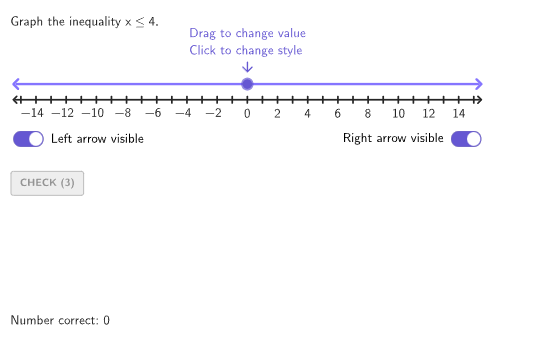
Loading the math board and drawing, please wait…
This example demonstrates how to graph inequalities on a number line. It involves core math concepts like inequality symbols (> < ≤ ≥ ≠) and their representation on a number line. Construction highlights include GeoGebra commands such as Shuffle, Point, Defined, Sequence, Zip, Polygon, Segment, Translate, suitable for 6-8 grade students learning to represent and graph simple inequalities using symbolic notation.
GeoGebra Commands & Parameters
Shuffle(Sequence[-13, 13]) → randomList1, {4, -6, -12, -10, 2, -4, 12, 11, 8, -3, 7, -8, -9, 0, -2, -1, 1, 10, 9, -13, -7, 13, 6, 5, -5, 3, -11}Shuffle(Sequence[15]) → randomList2, {2, 1, 15, 14, 4, 9, 3, 10, 11, 13, 12, 6, 7, 8, 5}Shuffle({1, 2, 3, 4, 5, 1, 2, 3, 4, 5}) → randomIneq, {4, 3, 3, 1, 5, 1, 2, 4, 5, 2}Point(Sequence[(A, studentOffset), A, -14, 14]) → P2Element(randomIneq, Mod[countQuestion, Length[randomIneq]] + 1) → ineqTypeDefined(IndexOf[ineqType, {GREATER, GREATEROREQUAL, NOTEQUAL}]) → showRightBranchPoint({ToggleLeftB, ToggleRightB}) → PToggleBPoint({ToggleLeftA, ToggleRightA}) → PToggleADefined(IndexOf[ineqType, {GREATER, LESS, NOTEQUAL}]) → expectedOpenDefined(IndexOf[ineqType, {LESS, LESSOREQUAL, NOTEQUAL}]) → showLeftBranchElement(randomList1, Mod[countQuestion, Length[randomList1]] + 1) → numASequence(minNumber, maxNumber) → allXZip((A, y(Anchor)), A, allX) → allPositionsZip((("$\text{" * A) * " }$"), A, {"\phantom{left}", "to the left", "to the right", "in both directions"}) → selectArrowsElement(randomList2, Mod[countQuestion, 15] + 1) → randomNum2Element(randomList1, Mod[countQuestion, 20] + 1) → randomNum1Polygon(Zip[PixelsToPoint[Corner[1], Corner[3], Corner[5], A], A, {(pixelsLeft, pixelsTop), (pixelsLeft, y(Corner[5]) - pixelsBottom), Corner[5] - (pixelsRight, pixelsBottom), (x(Corner[5]) - pixelsRight, pixelsTop)}]) → borderBoxCorner(5) → layoutAppSizeSegment(Anchor + (minNumber - 0.5, 0), Anchor + (maxNumber + 0.5, 0)) → numberLineZip(Segment[(A, -0.2), (A, 0.2)], A, allX) → ticksTranslate(ticks, vSoln) → solnTicksTranslate(numberLine, vSoln) → solnLineSegment(PSoln, (x(Anchor) + maxNumber + 0.5, y(PSoln))) → solnRightSegment(PSoln, (x(Anchor) + minNumber - 0.5, y(PSoln))) → solnLeftSegment(P2, (x(Anchor) + minNumber - 0.5, studentOffset)) → leftBranchSegment(P2, (x(Anchor) + maxNumber + 0.5, studentOffset)) → rightBranchonboardingTextOffset(Corner[onboardingText, 1], Corner[onboardingText, 3], onboardingCase, Corner[1], Corner[3], Corner[5]) → OnboardingTextOffsetcirclePixels(P2, 7 + (pulsing * 7), Corner[1], Corner[3], Corner[5]) → pulsingObjectZip(Text[("" * A), (A + If[A < 0, -0.25, 0], -0.1), true, true, 0, -1], A, Sequence[minNumber + 1, maxNumber, 2]) → digitsZip(Text[("" * A), (A + If[A < 0, -0.25, 0], -0.1) + vSoln, true, true, 0, -1], A, Sequence[minNumber + 1, maxNumber, 2]) → digitsSoln
AI Drawing Prompt Reference
Draw a number line from -14 to 14. Randomly select a point P2 on the number line and draw a segment to the left, right, or both directions from this point. Based on the randomly selected inequality type, mark the corresponding open or closed interval on the number line. Randomly select a number on the number line and mark its position, then label the ticks on both sides of this number.
The prompt above was compiled from the original drawing commands and is for reference only.