
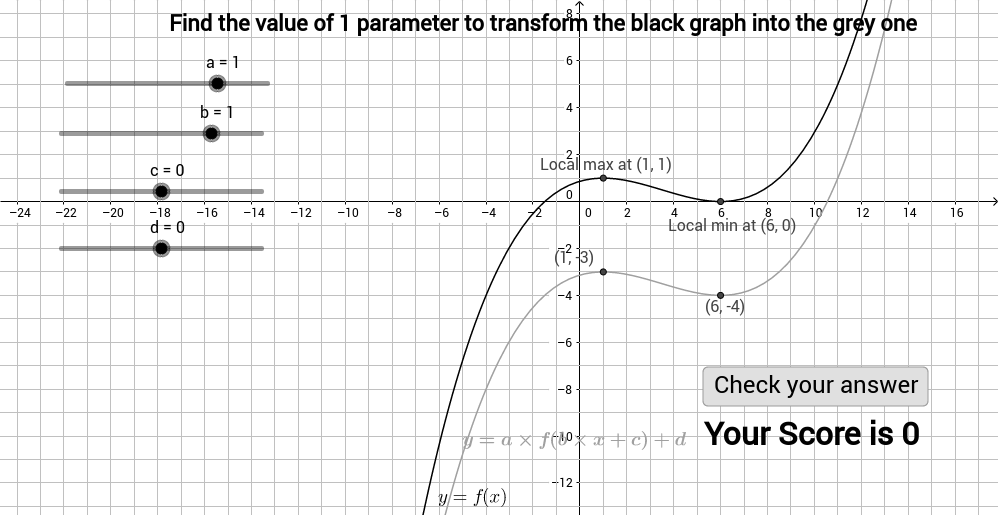
Graph transformation game - find 1 parameter
Loading the math board and drawing, please wait…
This example demonstrates the transformation of function graphs (ellipse) by varying a single parameter. Core math concepts include function graphs, ellipse, combinatorics, trigonometry, perimeter, and function transformations. It uses GeoGebra commands like Max, Min, and objects such as buttons (button1, button2), points (D, E), pictures (pic2, pic1), sliders (ard, brd, crd, drd), variables (f, b, c, d, text1, sc, text2, t, A, B, prd, a, k, C, F, g, check). Suitable for high school mathematics education to understand the impact of parameters on function graphs and enhance intuitive understanding of graphical transformations.
GeoGebra Commands & Parameters
Max(f, 0, 5) → AMin(f, 4, 6) → B
AI Drawing Prompt Reference
Draw a function graph showing the transformation of an ellipse by varying a single parameter, with two buttons to control parameter changes, two points marking key positions, a background picture, four sliders adjusting parameters, and related mathematical texts and graphical elements, starting with the ellipse and function graph, then adding control elements and text explanations.
The prompt above was compiled from the original drawing commands and is for reference only.