
Geometric Visualization of Matrix Addition
Loading the math board and drawing, please wait…
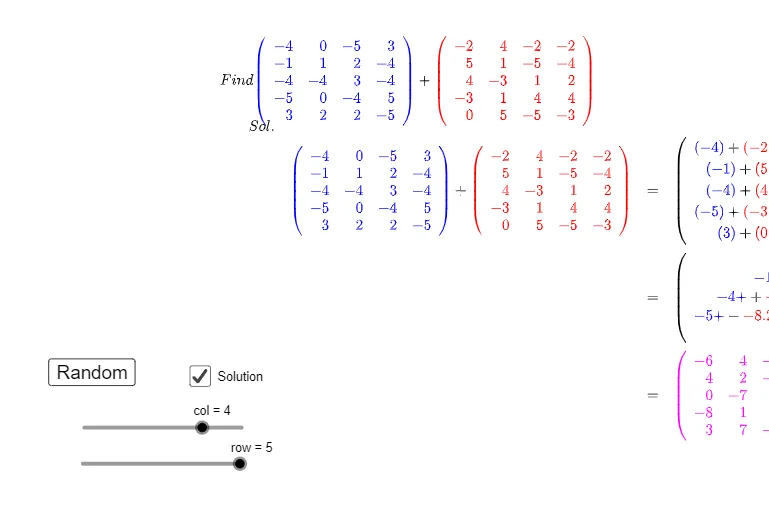
This example demonstrates, via an interactive geometry-style setup, how adding two matrices (or quantities defined through matrices, such as induced vector/linear-constraint results) changes the displayed outcome. The goal is to help learners connect algebraic matrix addition with the corresponding updated graphical quantities. Key concepts include matrix addition, algebraic computation, and any auxiliary function labeling (e.g., logarithm-related annotations) used to interpret or scale displayed measures. Construction-wise, GeoGebra’s Sequence and TableText are used to build structured lists and on-screen text entries that narrate the computation steps. Objects such as A, B, and derived matrices/arrays (A1, B1), together with intermediate results (e.g., lstAddAB, AddAB1) organize the addition pipeline. A button (button1) and an iteration index (j) control the animation or step-by-step progression. Multiple text objects (text1–text7 and related labels) present intermediate and final results, while optional objects like Ln1–Ln4 provide function-based annotations. The setup also uses operator/utility objects (Opr) and absolute/auxiliary quantities (Babs) to support consistent visualization. Suitable for late middle school through early undergraduate audiences for interactive practice and intuitive understanding of matrix addition.
GeoGebra Commands & Parameters
Sequence(Sequence[Random[-5, 5], j, 1, col], i, 1, row) → ASequence(Sequence[Random[-5, 5], j, 1, col], i, 1, row) → BSequence(Sequence["(" + (A(i, j)) + ")", j, 1, col], i, 1, row) → A1Sequence(Sequence["(" + (B(i, j)) + ")", j, 1, col], i, 1, row) → B1Sequence(Sequence["\blue{" + (A1(i, j)) + "}" + "+" + "\red{" + (B1(i, j)) + "}", j, 1, col], i, 1, row) → lstAddABSequence(Sequence[abs(B(i, j)), j, 1, col], i, 1, row) → BabsSequence(Sequence[If[B(i, j) < 0, "-", "+"], j, 1, col], i, 1, row) → OprSequence(Sequence["\blue{" + ((A(i, j) * "+}")) + (Opr(i, j)) + "\red{" + ((B * abs((i, j)))) + "}", j, 1, col], i, 1, row) → AddAB1TableText(lstAddAB, "()r") → text3TableText(AddAB1, "()r") → text4TableText({Ln1, Ln2, Ln3, Ln4}) → text6
AI Drawing Prompt Reference
Create an interactive geometry-style diagram illustrating matrix addition. Show two randomly generated matrices with elements colored blue and red respectively, and display their element-wise addition expressions. Below, list the intermediate results with signs colored to indicate positive or negative values, alongside absolute values for reference. Include a button to step through the process, with multiple text areas presenting sequential computation steps and final results. Add a few logarithmic curves as auxiliary annotations to help interpret scaled values. Arrange everything clearly for educational demonstration.
The prompt above was compiled from the original drawing commands and is for reference only.