
Geometric Visualization of a Stick Shadow: Angles, Locus, and Limits
Loading the math board and drawing, please wait…
In collections
Conic Section Collection
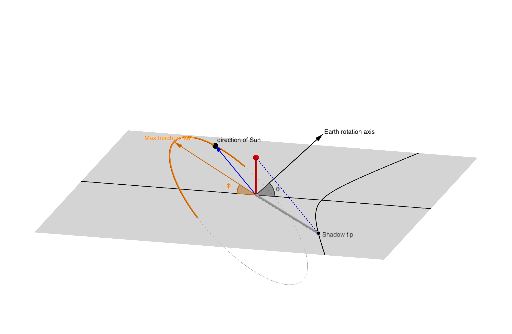
This example models the classic “shadow of a stick on the ground” scenario to visualize how the shadow position changes with a geometric parameter such as the sun elevation/angle. It highlights the asymptotic behavior suggested by the limit idea when the angle approaches extreme values. The construction centers on geometric intersection and parameterized angle relationships: using Intersect to find intersection points, Line/Circle/CircumcircleArc to create the guiding lines and arcs, Point/Segment/Center to define key locations and circle centers, and Angle to control and measure the driving angle (e.g., θ, α/β). A Locus object generates the moving shadow endpoint’s trajectory as the parameter varies, while Vector supports directional/scale relations. Suitable for secondary-to-early-undergraduate students learning geometric construction, trigonometric/angle modeling, and using GeoGebra for intuitive limit-based exploration.
GeoGebra Commands & Parameters
Intersect(zAxis, xAxis) → ALine(N, A) → gCircle(g, M) → cIntersect(xOyPlane, c) → C, DCircumcircleArc(D, M, C) → dPoint(zAxis) → BSegment(A, B) → fLine(A, M) → hCenter(c) → OPoint(d) → SSegment(S, A) → iLine(B, i) → jIntersect(j, xOyPlane) → S'Locus(S', S) → luogo1Segment(B, S') → kIntersect(yAxis, g) → ESegment(B, A) → lIntersect(yAxis, zAxis) → FVector(A, M) → uAngle(M, A, M') → αAngle(N, A, N') → βVector(A, N) → vPlane(G, M', N') → aVector(A, S) → wLine(M', N') → mSegment(A, S') → n
AI Drawing Prompt Reference
Create a 3D coordinate setup with axes and key reference points formed by axis intersections. Through one intersection point, draw a guiding line and construct a circle based on that line and a circle center determined from the circle. Intersect the circle with the ground plane to obtain two points, then draw the circumcircle arc through them with the circle center. Place additional points from axis intersections, connect them with segments to form the main “stick” and its direction line, and define the motion using two angle measures at the central point along with direction vectors. Project the moving endpoint onto the ground plane and depict the resulting trajectory as a locus curve, along with a segment linking the projected point to the fixed reference point to show the changing shadow distance.
The prompt above was compiled from the original drawing commands and is for reference only.