
Geometric Construction of a Möbius-Style Circular Band
Loading the math board and drawing, please wait…
In collections
geometriadinamica.es
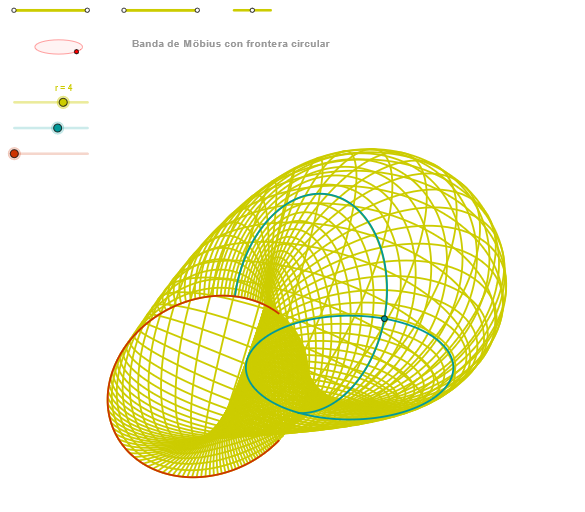
This example demonstrates a Möbius-style circular band by constructing and visualizing a twisted, continuous curve/band structure using geometric constraints. It highlights the key idea behind the Möbius strip: a half-twist yields a single, connected surface-like object. The main mathematics involved includes circle/ellipse geometry (using intersections and related constructions), angle control to define the twist direction, and orthogonal projections/lines to build consistent local orientation. In GeoGebra, the construction relies on Segment and Point to create guiding elements; OrthogonalLine to obtain perpendicular relationships; Circle and Intersect to generate anchor points from circle crossings; Ellipse to form auxiliary parametric shapes; Angle to regulate the turning/twisting; and CurveCartesian together with Sequence to sample and draw the final parameterized curve/band. Suitable for high school through early university levels, especially for geometry construction, analytic geometry visualization, and parametric-curve exploration.
GeoGebra Commands & Parameters
Segment(Q3, Q4) → p2Point(p2) → P3Segment(P3, Q4) → p4Point(p4) → P4Segment(Q1, Q2) → p1Point(p1) → P1Segment(P1, Q2) → p3Point(p3) → P2OrthogonalLine(C, xAxis) → zz2Circle(C, 0.62) → zz0Intersect(zz0, zz2, 1) → ZZ4Intersect(zz0, zz2, 2) → ZZ3Ellipse(ZZ3, ZZ4, 0.65) → zElipse2Point(zElipse2) → ZIntersect(zElipse2, zz2) → ZZ7, ZZ8Angle(ZZ8, C, Z) → zAngIncOrthogonalLine(C, yAxis) → zz1Intersect(zz0, zz1, 2) → ZZ2Intersect(zz0, zz1, 1) → ZZ1Ellipse(ZZ1, ZZ2, 0.65) → zElipse1Point(zElipse1) → XYIntersect(zElipse1, zz1) → ZZ5, ZZ6Angle(ZZ6, C, XY) → zAngRotSegment(Q5, Q6) → p5Point(p5) → P5Segment(ZZ5, ZZ6) → zz4Segment(ZZ7, ZZ8) → zz3Intersect(zElipse2, zElipse1, 1) → zPunto1Intersect(zElipse2, zElipse1, 4) → zPunto2Segment(zPunto1, zPunto2) → zSeg2CurveCartesian((r / 2 * ((((-2 * cos((2 * α))) * sin(v) / (-2 + ((sqrt(2) * sin(α)) * cos(v)) + ((sqrt(2) * sin((2 * α))) * sin(v)))) * sin(zAngRot)) + ((sqrt(2) * ((sin(α) * cos(v)) - (sin((2 * α)) * sin(v))) / (-2 + ((sqrt(2) * sin(α)) * cos(v)) + ((sqrt(2) * sin((2 * α))) * sin(v)))) * cos(zAngRot)))), (r / 2 * (((((2 * cos((2 * α))) * sin(v) / (-2 + ((sqrt(2) * sin(α)) * cos(v)) + ((sqrt(2) * sin((2 * α))) * sin(v)))) * cos(zAngRot)) * sin(zAngInc)) + (((sqrt(2) * ((sin(α) * cos(v)) - (sin((2 * α)) * sin(v))) / (-2 + ((sqrt(2) * sin(α)) * cos(v)) + ((sqrt(2) * sin((2 * α))) * sin(v)))) * sin(zAngRot)) * sin(zAngInc)) - (((2 * cos(α)) * cos(v) / (-2 + ((sqrt(2) * sin(α)) * cos(v)) + ((sqrt(2) * sin((2 * α))) * sin(v)))) * cos(zAngInc)))) - 2, v, v1, v2) → curva2CurveCartesian((r / 2 * (((-2 * cos((2 * u)) / (-2 + (sqrt(2) * sin((2 * u))))) * sin(zAngRot)) + ((sqrt(2) * ((-sin((2 * u)))) / (-2 + (sqrt(2) * sin((2 * u))))) * cos(zAngRot)))), (r / 2 * ((((2 * cos((2 * u)) / (-2 + (sqrt(2) * sin((2 * u))))) * cos(zAngRot)) * sin(zAngInc)) + (((sqrt(2) * ((-sin((2 * u)))) / (-2 + (sqrt(2) * sin((2 * u))))) * sin(zAngRot)) * sin(zAngInc)))) - 2, u, u1, u2) → curva1CurveCartesian((r / 2 * ((((-2 * cos((2 * u))) * sin(β) / (-2 + ((sqrt(2) * sin(u)) * cos(β)) + ((sqrt(2) * sin((2 * u))) * sin(β)))) * sin(zAngRot)) + ((sqrt(2) * ((sin(u) * cos(β)) - (sin((2 * u)) * sin(β))) / (-2 + ((sqrt(2) * sin(u)) * cos(β)) + ((sqrt(2) * sin((2 * u))) * sin(β)))) * cos(zAngRot)))), (r / 2 * (((((2 * cos((2 * u))) * sin(β) / (-2 + ((sqrt(2) * sin(u)) * cos(β)) + ((sqrt(2) * sin((2 * u))) * sin(β)))) * cos(zAngRot)) * sin(zAngInc)) + (((sqrt(2) * ((sin(u) * cos(β)) - (sin((2 * u)) * sin(β))) / (-2 + ((sqrt(2) * sin(u)) * cos(β)) + ((sqrt(2) * sin((2 * u))) * sin(β)))) * sin(zAngRot)) * sin(zAngInc)) - (((2 * cos(u)) * cos(β) / (-2 + ((sqrt(2) * sin(u)) * cos(β)) + ((sqrt(2) * sin((2 * u))) * sin(β)))) * cos(zAngInc)))) - 2, u, u1, u2) → a1Sequence(CurveCartesian[(r / 2 * ((((-2 * cos((2 * u))) * sin(v) / (-2 + ((sqrt(2) * sin(u)) * cos(v)) + ((sqrt(2) * sin((2 * u))) * sin(v)))) * sin(zAngRot)) + ((sqrt(2) * ((sin(u) * cos(v)) - (sin((2 * u)) * sin(v))) / (-2 + ((sqrt(2) * sin(u)) * cos(v)) + ((sqrt(2) * sin((2 * u))) * sin(v)))) * cos(zAngRot)))), (r / 2 * (((((2 * cos((2 * u))) * sin(v) / (-2 + ((sqrt(2) * sin(u)) * cos(v)) + ((sqrt(2) * sin((2 * u))) * sin(v)))) * cos(zAngRot)) * sin(zAngInc)) + (((sqrt(2) * ((sin(u) * cos(v)) - (sin((2 * u)) * sin(v))) / (-2 + ((sqrt(2) * sin(u)) * cos(v)) + ((sqrt(2) * sin((2 * u))) * sin(v)))) * sin(zAngRot)) * sin(zAngInc)) - (((2 * cos(u)) * cos(v) / (-2 + ((sqrt(2) * sin(u)) * cos(v)) + ((sqrt(2) * sin((2 * u))) * sin(v)))) * cos(zAngInc)))) - 2, u, u1, u2], v, v1, v2, (2 * paso)) → list3Sequence(CurveCartesian[(r / 2 * ((((-2 * cos((2 * u))) * sin(v) / (-2 + ((sqrt(2) * sin(u)) * cos(v)) + ((sqrt(2) * sin((2 * u))) * sin(v)))) * sin(zAngRot)) + ((sqrt(2) * ((sin(u) * cos(v)) - (sin((2 * u)) * sin(v))) / (-2 + ((sqrt(2) * sin(u)) * cos(v)) + ((sqrt(2) * sin((2 * u))) * sin(v)))) * cos(zAngRot)))), (r / 2 * (((((2 * cos((2 * u))) * sin(v) / (-2 + ((sqrt(2) * sin(u)) * cos(v)) + ((sqrt(2) * sin((2 * u))) * sin(v)))) * cos(zAngRot)) * sin(zAngInc)) + (((sqrt(2) * ((sin(u) * cos(v)) - (sin((2 * u)) * sin(v))) / (-2 + ((sqrt(2) * sin(u)) * cos(v)) + ((sqrt(2) * sin((2 * u))) * sin(v)))) * sin(zAngRot)) * sin(zAngInc)) - (((2 * cos(u)) * cos(v) / (-2 + ((sqrt(2) * sin(u)) * cos(v)) + ((sqrt(2) * sin((2 * u))) * sin(v)))) * cos(zAngInc)))) - 2, v, v1, v2], u, u1, u2, paso) → list1
AI Drawing Prompt Reference
Draw a Möbius-style circular band with a half-twist, formed by two intersecting ellipses that define the twist orientation. Use circles and perpendicular lines to establish anchor points, and angles to control rotation and tilt. The final shape is a continuous, single-sided surface-like band generated by parametric curves, showing a twisted loop with a seamless connection.
The prompt above was compiled from the original drawing commands and is for reference only.