
Geometric Tiling Cost Calculation
Loading the math board and drawing, please wait…
In collections
Proofs Without Words
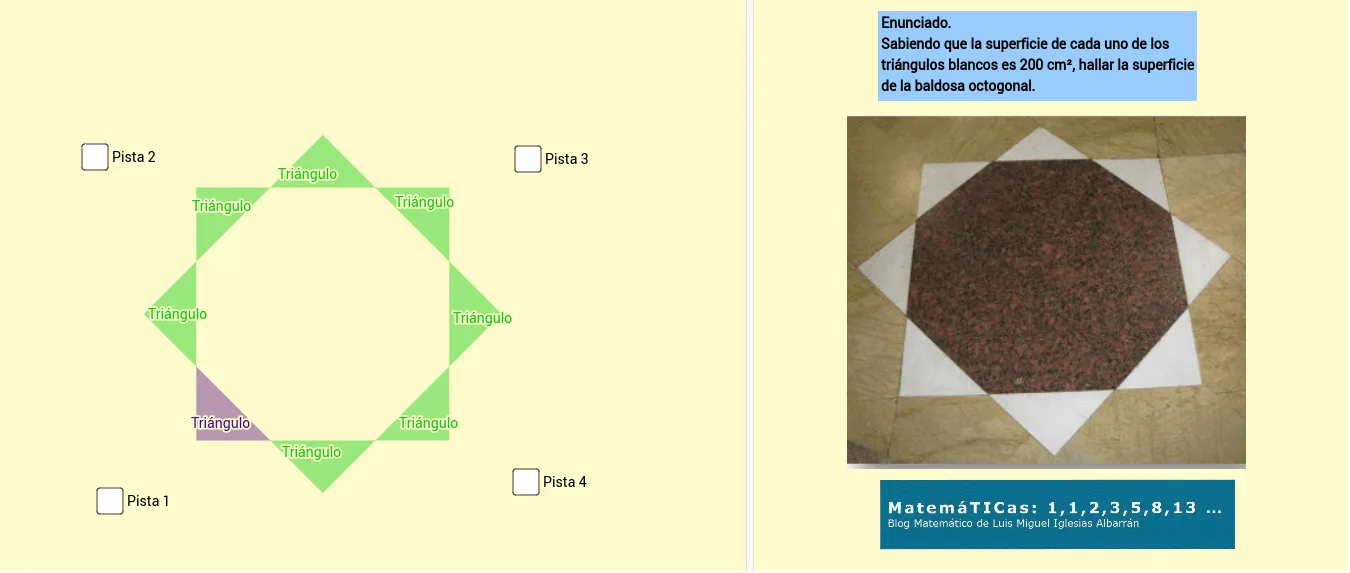
This example demonstrates how to use GeoGebra to model geometric tiling and calculate material costs. It involves core math concepts like coordinate geometry, integral calculus, and symmetry analysis. Construction highlights include using commands such as Intersect, Point, Segment, Circle, Polygon, and Line. Suitable for high school mathematics teaching or STEM project practice, integrating mathematical modeling with real-world applications.
GeoGebra Commands & Parameters
Intersect(xAxis, yAxis) → APoint(Circle[A, sqrt(400)]) → BSegment(A, B) → fCircle(A, B) → cIntersect(c, yAxis) → C, DPolygon(D, B, A) → Triángulo_1, a, d, bCircle(D, sqrt(800)) → eIntersect(e, yAxis) → E, FCircle(F, 20) → gCircle(D, 20) → hIntersect(h, g) → G, H, ,Polygon(D, G, F) → Triángulo_2, f_1, d_1, g_1Circle(F, 20) → kIntersect(k, yAxis) → I, JPoint(Circle[J, 20]) → KSegment(J, K) → iPolygon(F, J, K) → Triángulo_3, k_1, f_2, jPoint(Circle[B, sqrt(800)]) → LSegment(B, L) → lPoint(Circle[L, 20]) → MSegment(L, M) → mLine(M, yAxis) → nPoint(n) → NPolygon(L, M, N) → Triángulo_4, n_1, l_1, m_1Line(F, xAxis) → pIntersect(p, n) → OLine(G, xAxis) → qCircle(N, 20) → rIntersect(r, q) → P, QPolygon(N, Q, O) → Triángulo_5, o, n_2, q_1Circle(O, 20) → sIntersect(s, n) → R, SCircle(S, 20) → tLine(J, K) → h_1Intersect(t, h_1) → T, UPolygon(T, S, O) → Triángulo_6, o_1, t_1, s_1Polygon(K, T, O, N, L, B, D, F) → Octógono, k_2, t_2, o_2, n_3, l_2, b_1, d_2, f_3Circle(B, 20) → c_1Circle(L, 20) → e_1Intersect(e_1, c_1) → V, W, ,Polygon(B, L, V) → Triángulo_7, v, b_2, l_3Circle(K, 20) → p_1Circle(T, 20) → r_1Intersect(p_1, r_1) → Z, A_1, ,Polygon(K, Z, T) → Triángulo_8, t_3, k_3, z_1Polygon(A, M, 4) → Cuadrado, i_1, j_1, a_1, g_2, D_1, E_1