
Geometric Mean Demonstration by nicolesusanne29 (2)
Loading the math board and drawing, please wait…
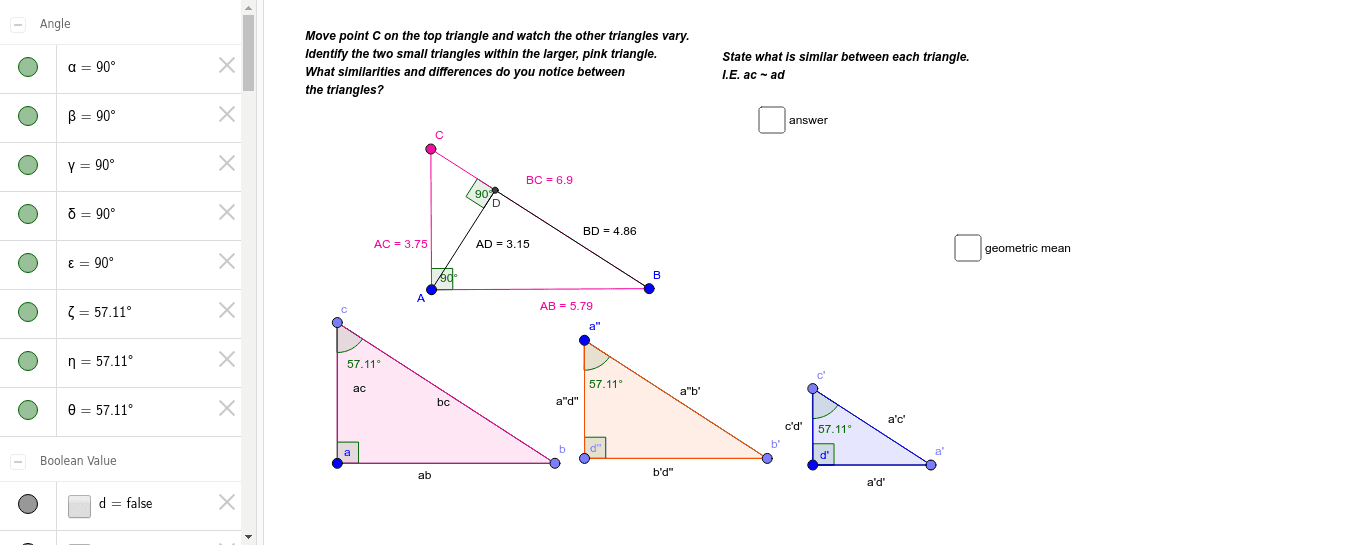
This example demonstrates how to construct the geometric mean graphically using GeoGebra. It involves core mathematical concepts such as geometric mean, normal distribution, terms, cylinders, subtraction, and natural numbers. The construction uses commands like Segment, OrthogonalLine, Point, Angle, Intersect, and Polygon. Suitable for high school mathematics teaching or for math enthusiasts to understand the practical application of the geometric mean.
GeoGebra Commands & Parameters
Segment(A, B) → ABOrthogonalLine(A, AB) → gPoint(g) → CSegment(C, B) → BCSegment(C, A) → ACSegment(A, B) → jAngle(B, A, C) → αOrthogonalLine(A, BC) → kIntersect(k, BC) → DAngle(C, D, A) → βSegment(A, D) → ADSegment(B, D) → BDPoint(Circle[a, AC]) → cSegment(a, c) → acPoint(Circle[a, AB]) → bSegment(a, b) → abAngle(b, a, c) → γSegment(c, b) → bcPoint(Circle[a'', AD]) → d''Segment(a'', d'') → a''d''Point(Circle[d'', BD]) → b'Segment(d'', b') → b'd''Segment(a'', b') → a''b'Angle(b', d'', a'') → εPolygon(c, a, b) → poly1, b_2, c_2, a_2Polygon(a'', d'', b') → poly3, b'_1, a''_1, d''_1Angle(a, c, b) → ζAngle(d'', a'', b') → θPoint(Circle[d', Distance[C, D]]) → c'Segment(d', c') → c'd'Point(Circle[d', AD]) → a'Segment(d', a') → a'd'Angle(a', d', c') → δSegment(c', a') → a'c'Angle(d', c', a') → ηPolygon(c', d', a') → poly2, a'_1, c'_1, d'_1
AI Drawing Prompt Reference
Draw a geometric construction to demonstrate the geometric mean. Start by drawing a line segment, then draw a perpendicular line from one endpoint and mark a point on it. Connect this point to the other endpoint of the segment. Next, draw circles centered at both endpoints of the segment, intersecting the segment at two points. Connect these points and the point on the perpendicular line, forming two triangles. Finally, connect all the points and line segments to visualize the geometric mean.
The prompt above was compiled from the original drawing commands and is for reference only.