
Geometric Demo of Cardinality of Two Sets
Loading the math board and drawing, please wait…
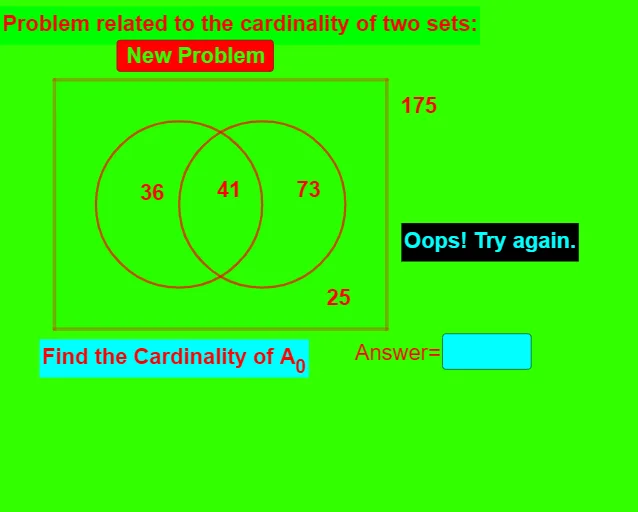
① This applet constructs points, circles, and polygons on the plane to visually compare the cardinalities of two sets. ② It covers the core concepts of set cardinality, one‑to‑one correspondence, and counting finite sets. ③ Construction highlights: commands Intersect, Point, Circle, Random, Polygon, Element, Textfield create objects A, B, C, D, E, circle c, polygon q1, text fields text1‑text10, InputBox1 and button1, enabling dynamic generation of set elements and live cardinality display. ④ Suitable for high‑school “Sets and Functions” lessons, introductory discrete mathematics at university, or self‑study.
GeoGebra Commands & Parameters
Intersect(xAxis, yAxis) → APoint(xAxis) → BCircle(E, 2) → ePoint(e) → FCircle(F, 2) → fRandom(1, 100) → B0Random(1, 100) → A0Random(1, 25) → cRandom(1, 50) → ABPolygon(A, B, C, D) → q1, a, b, c_1, dElement(problem, m) → text6Textfield(sans) → InputBox1Element(answer, m) → tans
AI Drawing Prompt Reference
Draw a Cartesian plane with the origin, place a point on the x‑axis, draw a circle of radius 2 centered at a chosen point, pick a point on that circle and draw a second circle of radius 2 around it; use random values to set the sizes of two finite sets and represent each set by a quadrilateral formed from four vertices; include text fields showing the problem statement and answer, an input box for user entry, and a button to regenerate the sets while displaying the cardinalities of both sets in real time.
The prompt above was compiled from the original drawing commands and is for reference only.