
Geometric Demo of Adding Negatives: Understanding Integer Addition via Vectors
Loading the math board and drawing, please wait…
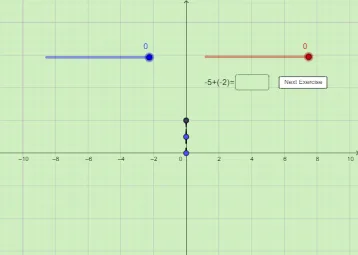
This example uses a plane-geometry setup to demonstrate that adding a negative number corresponds to a displacement in the opposite direction, making integer addition visually intuitive. It centers on integer addition and the meaning of signs, as well as vector direction and length (vector addition as equivalent to chaining displacements). The construction also leverages coordinate-geometry curve elements—such as circles/ellipses/parabolas—to provide a visual “carrier” for changes and patterns during interaction. In GeoGebra, it is built using commands like Vector and Segment to create directed displacements and connecting pieces, Random to generate points/parameters, and Textfield/InputBox1 plus button1/button2 with ans/ans1 and text1 to manage user interaction and display results. Key objects include variables/points such as a, b, C, B, D, k, A, j, E, F, f, g, h, L, m, along with interface elements for computed outputs. Suitable for middle-school to early high-school learners and for lessons that connect number sense with vectors and coordinate geometry.
GeoGebra Commands & Parameters
Vector(B, D) → kVector(A, C) → jSegment(E, A) → fSegment(C, B) → gSegment(F, D) → hRandom(0, -5) → LRandom(0, -5) → mTextfield(empty1) → InputBox1
AI Drawing Prompt Reference
Create a plane-geometry diagram to visually connect integer addition with vector displacement in opposite directions. Construct two directed vectors: one from point B toward point D and another from point A toward point C, then draw the corresponding line segments that connect the relevant endpoints to form a clear “chained displacement” path. Place two additional points with y-coordinates chosen randomly in the lower region to serve as adjustable references for the movement. Include a text input field for entering or displaying an intermediate value, keeping the focus on how sign changes relate to direction, and how vector length and direction represent integer addition.
The prompt above was compiled from the original drawing commands and is for reference only.