
Geometric Constructions & Random Experiments Demo
Loading the math board and drawing, please wait…
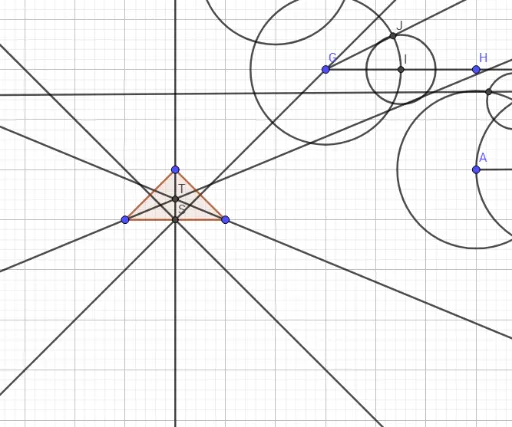
This example dynamically demonstrates the interaction between random experiments and geometric figures through construction. It involves core math concepts like coordinate geometry, probability & statistics, and geometric construction. Key GeoGebra commands used include Segment, Circle, Intersect, Rotate, Angle, Point, Ray, Distance, Line, Polygon, LineBisector, and AngularBisector. Suitable for high school and above learners to understand the integration of geometric construction and probability statistics.
GeoGebra Commands & Parameters
Segment(A_1, B_1) → fCircle(A_1, B_1) → cCircle(B_1, A_1) → dIntersect(c, d, 1) → C_1Segment(C_1, A_1) → gSegment(C_1, B_1) → hRotate(D_1, (-(60°)), E_1) → D'Angle(D', E_1, D_1) → αSegment(D_1, E_1) → iSegment(E_1, D') → jPoint(j) → FCircle(E_1, F) → eIntersect(e, j, 1) → G_1Intersect(e, i, 1) → H_1Circle(F, I_1) → kCircle(H_1, J_1) → pIntersect(k, p, 2) → KSegment(E_1, K) → lCircle(A_2, 3) → qSegment(A_2, B_2) → mSegment(A_2, C_2) → nIntersect(q, n, 1) → D_2Intersect(q, m, 1) → E_2Ray(G, H) → rCircle(G, 3) → sIntersect(s, r, 1) → IDistance(D_2, E_2) → distanceDECircle(I, 1.38) → tIntersect(s, t, 1) → JRay(G, J) → aSegment(A, B) → bCircle(A, B) → c_1Circle(B, L) → d_1Intersect(c_1, d_1, 1) → CIntersect(c_1, d_1, 2) → DLine(C, D) → f_1Intersect(b, f_1) → EPoint(c_1) → MCircle(C, M) → e_1Intersect(c_1, e_1, 2) → NIntersect(d_1, e_1, 2) → OLine(N, O) → g_1Polygon(P, Q, R) → t1, r_1, p_1, q_1LineBisector(P, Q) → h_1LineBisector(P, R) → i_1LineBisector(Q, R) → j_1Intersect(h_1, j_1) → SAngularBisector(P, R, Q) → k_1AngularBisector(Q, P, S) → l_1Intersect(i_1, k_1) → T
AI Drawing Prompt Reference
Create a diagram combining geometric construction with random experiments. Start by constructing an equilateral triangle using two circles with a common radius and their intersection. Then create a rotated angle and use it to draw circles and segments, generating multiple intersection points. Next, draw a circle with a given radius and a ray to form random points. Construct the perpendicular bisector of a segment)Skip and use a point on a circle to create auxiliary circles, obtaining intersection lines. Finally, draw a triangle and show the perpendicular bisectors of its sides meeting at a point, along with an angle bisector.
The prompt above was compiled from the original drawing commands and is for reference only.