
Geometric Construction with Circles, Ellipses, and Measured Angles
Loading the math board and drawing, please wait…
In collections
geometriadinamica.es
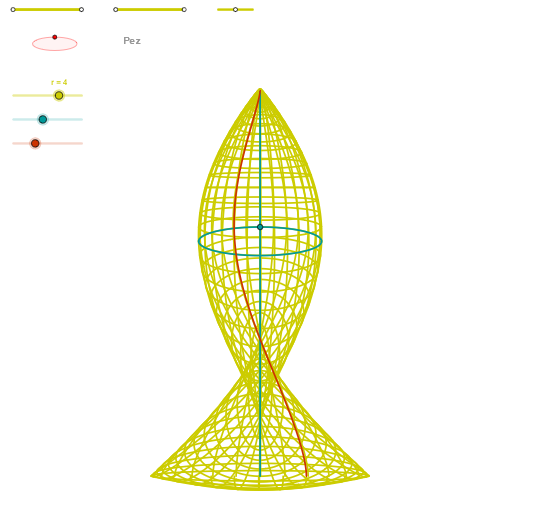
This GeoGebra example demonstrates how to build a coupled planar construction using segments, points, circles, and ellipses, where intersections drive the resulting angle measures and curve generation. It centers on geometric construction concepts (creating points/lines and their intersections), circle and ellipse geometry, angle measurement using the Angle tool, and rendering coordinate-form curves via CurveCartesian. From the construction summary, the key commands include Segment, Point, OrthogonalLine, Circle, Intersect, Ellipse, Angle, CurveCartesian, and Sequence, alongside intermediate constructed objects such as multiple labeled points (e.g., P1–P4), intersection-related points (e.g., Q1–Q4), and ellipse objects (e.g., zElipse1/zElipse2). The workflow reflects a typical modeling pipeline: construct base geometry, compute intersections to determine the configuration, generate ellipse/curve features, and optionally use sequences for dynamic or iterative behavior. Suitable for middle and high school learners and for classroom demonstrations on geometric construction and graphing-style curve visualization.
GeoGebra Commands & Parameters
Segment(Q3, Q4) → p2Point(p2) → P3Segment(P3, Q4) → p4Point(p4) → P4Segment(Q1, Q2) → p1Point(p1) → P1Segment(P1, Q2) → p3Point(p3) → P2OrthogonalLine(C, xAxis) → zz2Circle(C, 0.62) → zz0Intersect(zz0, zz2, 1) → ZZ4Intersect(zz0, zz2, 2) → ZZ3Ellipse(ZZ3, ZZ4, 0.65) → zElipse2Point(zElipse2) → ZIntersect(zElipse2, zz2) → ZZ7, ZZ8Angle(ZZ8, C, Z) → zAngIncOrthogonalLine(C, yAxis) → zz1Intersect(zz0, zz1, 2) → ZZ2Intersect(zz0, zz1, 1) → ZZ1Ellipse(ZZ1, ZZ2, 0.65) → zElipse1Point(zElipse1) → XYIntersect(zElipse1, zz1) → ZZ5, ZZ6Angle(ZZ6, C, XY) → zAngRotSegment(Q5, Q6) → p5Point(p5) → P5Segment(ZZ5, ZZ6) → zz4Segment(ZZ7, ZZ8) → zz3Intersect(zElipse2, zElipse1, 1) → zPunto1Intersect(zElipse2, zElipse1, 4) → zPunto2Segment(zPunto1, zPunto2) → zSeg2CurveCartesian(((1.6 * r) * ((((cos(α) - cos((2 * α))) * cos(v) / 4) * sin(zAngRot)) + (((sin(α) - sin((2 * α))) * sin(v) / 4) * cos(zAngRot)))), ((1.6 * r) * (((((-(cos(α) - cos((2 * α)))) * cos(v) / 4) * cos(zAngRot)) * sin(zAngInc)) + ((((sin(α) - sin((2 * α))) * sin(v) / 4) * sin(zAngRot)) * sin(zAngInc)) + (cos(α) * cos(zAngInc)))), v, v1, v2) → curva2CurveCartesian((((1.6 * r) * (sin(u) - sin((2 * u))) / 4) * cos(zAngRot)), ((1.6 * r) * ((((sin(u) - sin((2 * u))) / 4 * sin(zAngRot)) * sin(zAngInc)) + (cos(u) * cos(zAngInc)))), u, u1, u2) → curva1CurveCartesian(((1.6 * r) * ((((cos(u) - cos((2 * u))) * cos(β) / 4) * sin(zAngRot)) + (((sin(u) - sin((2 * u))) * sin(β) / 4) * cos(zAngRot)))), ((1.6 * r) * (((((-(cos(u) - cos((2 * u)))) * cos(β) / 4) * cos(zAngRot)) * sin(zAngInc)) + ((((sin(u) - sin((2 * u))) * sin(β) / 4) * sin(zAngRot)) * sin(zAngInc)) + (cos(u) * cos(zAngInc)))), u, u1, u2) → a1Sequence(CurveCartesian[((1.6 * r) * ((((cos(u) - cos((2 * u))) * cos(v) / 4) * sin(zAngRot)) + (((sin(u) - sin((2 * u))) * sin(v) / 4) * cos(zAngRot)))), ((1.6 * r) * (((((-(cos(u) - cos((2 * u)))) * cos(v) / 4) * cos(zAngRot)) * sin(zAngInc)) + ((((sin(u) - sin((2 * u))) * sin(v) / 4) * sin(zAngRot)) * sin(zAngInc)) + (cos(u) * cos(zAngInc)))), u, u1, u2], v, v1, v2, (3 * paso)) → list1Sequence(CurveCartesian[((1.6 * r) * ((((cos(u) - cos((2 * u))) * cos(v) / 4) * sin(zAngRot)) + (((sin(u) - sin((2 * u))) * sin(v) / 4) * cos(zAngRot)))), ((1.6 * r) * (((((-(cos(u) - cos((2 * u)))) * cos(v) / 4) * cos(zAngRot)) * sin(zAngInc)) + ((((sin(u) - sin((2 * u))) * sin(v) / 4) * sin(zAngRot)) * sin(zAngInc)) + (cos(u) * cos(zAngInc)))), v, v1, v2], u, u1, u2, paso) → list2
AI Drawing Prompt Reference
This is a geometric construction involving circles, ellipses, and measured angles. It includes two ellipses determined by the intersection of a circle with lines perpendicular to the coordinate axes. Points on the ellipses are used to measure angles, which are then used to generate curves. The construction sequence: draw segments and points, draw circle and perpendicular lines, find intersections, draw ellipses, measure angles, and generate curves. Suitable for educational demonstrations.
The prompt above was compiled from the original drawing commands and is for reference only.