
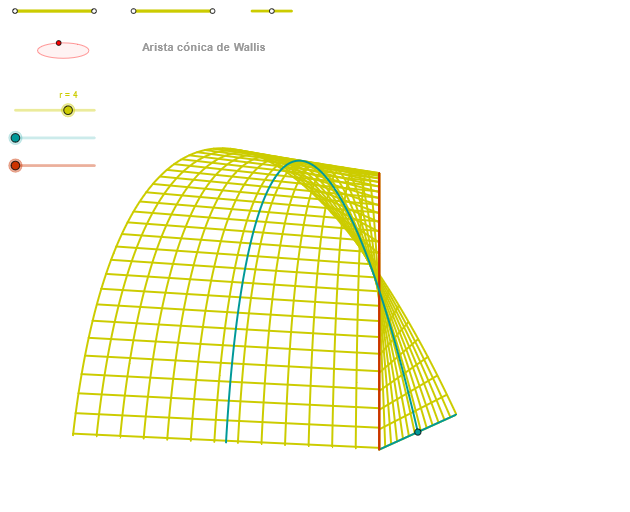
Geometric Construction of Wallis Conical Edge
Loading the math board and drawing, please wait…
In collections
geometriadinamica.es
This example demonstrates the geometric construction of the Wallis conical edge (arista cónica de Wallis), a special edge or intersection curve related to conic sections. The core mathematical concepts involve conic sections (ellipse), orthogonal lines, intersections, angles, and parametric curves. The construction uses GeoGebra commands such as Segment, Point, OrthogonalLine, Circle, Intersect, Ellipse, Angle, CurveCartesian, and Sequence, creating multiple points (e.g., v20, v10, p, u20, u10), lines, circles, ellipses, and parametric curves, with sequences generating dynamic structures. It is suitable for high school or university courses in analytic geometry, conic sections, or geometric construction, to explore interactions between conics, lines, and circles, as well as parametric curve construction.
GeoGebra Commands & Parameters
Segment(Q3, Q4) → p2Point(p2) → P3Segment(P3, Q4) → p4Point(p4) → P4Segment(Q1, Q2) → p1Point(p1) → P1Segment(P1, Q2) → p3Point(p3) → P2OrthogonalLine(C, xAxis) → zz2Circle(C, 0.62) → zz0Intersect(zz0, zz2, 1) → ZZ4Intersect(zz0, zz2, 2) → ZZ3Ellipse(ZZ3, ZZ4, 0.65) → zElipse2Point(zElipse2) → ZIntersect(zElipse2, zz2) → ZZ7, ZZ8Angle(ZZ8, C, Z) → zAngIncOrthogonalLine(C, yAxis) → zz1Intersect(zz0, zz1, 2) → ZZ2Intersect(zz0, zz1, 1) → ZZ1Ellipse(ZZ1, ZZ2, 0.65) → zElipse1Point(zElipse1) → XYIntersect(zElipse1, zz1) → ZZ5, ZZ6Angle(ZZ6, C, XY) → zAngRotSegment(Q5, Q6) → p5Point(p5) → P5Segment(ZZ5, ZZ6) → zz4Segment(ZZ7, ZZ8) → zz3Intersect(zElipse2, zElipse1, 1) → zPunto1Intersect(zElipse2, zElipse1, 4) → zPunto2Segment(zPunto1, zPunto2) → zSeg2CurveCartesian(((2 * r) * (((v * cos(α)) * sin(zAngRot)) + ((v * sin(α)) * cos(zAngRot)))) + 2, ((2 * r) * (((((-v) * cos(α)) * cos(zAngRot)) * sin(zAngInc)) + ((v * sin(zAngRot)) * sin(zAngInc)) + ((3 * sin(α)) * cos(zAngInc)))) - 20, v, v1, v2) → curva2CurveCartesian(((2 * r) * (((β * cos(u)) * sin(zAngRot)) + ((β * sin(u)) * cos(zAngRot)))) + 2, ((2 * r) * (((((-β) * cos(u)) * cos(zAngRot)) * sin(zAngInc)) + ((β * sin(zAngRot)) * sin(zAngInc)) + ((3 * sin(u)) * cos(zAngInc)))) - 20, u, u1, u2) → a1CurveCartesian(((2 * r) * (((0.5 * cos(u)) * sin(zAngRot)) + ((0.5 * sin(u)) * cos(zAngRot)))) + 2, ((2 * r) * ((((-0.5 * cos(u)) * cos(zAngRot)) * sin(zAngInc)) + ((0.5 * sin(zAngRot)) * sin(zAngInc)) + ((3 * sin(u)) * cos(zAngInc)))) - 20, u, u1, u2) → curva1Sequence(CurveCartesian[((2 * r) * (((v * cos(u)) * sin(zAngRot)) + ((v * sin(u)) * cos(zAngRot)))) + 2, ((2 * r) * (((((-v) * cos(u)) * cos(zAngRot)) * sin(zAngInc)) + ((v * sin(zAngRot)) * sin(zAngInc)) + ((3 * sin(u)) * cos(zAngInc)))) - 20, u, u1, u2], v, v1, v2, (2.5 * paso)) → list2Sequence(CurveCartesian[((2 * r) * (((v * cos(u)) * sin(zAngRot)) + ((v * sin(u)) * cos(zAngRot)))) + 2, ((2 * r) * (((((-v) * cos(u)) * cos(zAngRot)) * sin(zAngInc)) + ((v * sin(zAngRot)) * sin(zAngInc)) + ((3 * sin(u)) * cos(zAngInc)))) - 20, v, v1, v2], u, u1, u2, paso) → list1
AI Drawing Prompt Reference
The figure consists of ellipses, orthogonal lines, circles, and parametric curves. Ellipses intersect orthogonal lines to yield two points, which together with circle intersections form another ellipse. Ellipse-circle intersection points serve as the starting points for parametric curves, which are generated by rotation and scaling. The figure illustrates the relationships between ellipses, circles, and orthogonal lines, as well as the parametric curve generation process. The construction order is: first draw ellipses and circles, then construct orthogonal lines, find intersections, and finally generate parametric curves.
The prompt above was compiled from the original drawing commands and is for reference only.