
Geometric Construction of a Rational Quadratic Bezier Curve
Loading the math board and drawing, please wait…
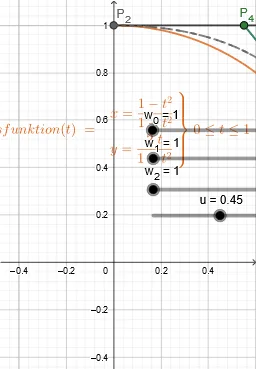
This example demonstrates how to construct a rational quadratic Bezier curve from three control points and how introducing weights changes the curve shape (a “rational” pull compared to the non-rational quadratic Bezier). Key concepts include rational Bezier parameterization, quadratic interpolation, the role of weight parameters (w0, w1, w2), and representing the curve as a parametric Cartesian curve (CurveCartesian). In GeoGebra, construction is carried out using core commands such as Point and Segment to define control points and auxiliary elements (e.g., P_0, P_1, P_2 and intermediate points/segments), then computing parameter-dependent objects like P_t and weighted combinations (via intermediate variables such as h, a, and the weights w0,w1,w2) to generate the final curve object (e.g., q). It is well-suited for advanced high-school geometry, pre-university calculus/analytic geometry enrichment, and introductory computer graphics or geometric modeling lessons.
GeoGebra Commands & Parameters
Point(xAxis) → P_0Point(yAxis) → P_2Segment(P_0, P_1) → fSegment(P_1, P_2) → gSegment(P_{3}, P_{4}) → hCurveCartesian(((1 - t)^(2) * x(P_0)) + (((2 * t) * (1 - t)) * x(P_1)) + (t^(2) * x(P_2)), ((1 - t)^(2) * y(P_0)) + (((2 * t) * (1 - t)) * y(P_1)) + (t^(2) * y(P_2)), t, 0, 1) → aSegment(P_{d}, P_{e}) → iCurveCartesian((1 - t^(2)) / (1 + t^(2)), ((2 * t)) / (1 + t^(2)), t, 0, 1) → EinheitskreisfunktionCurveCartesian((((1 - t)^(2) * x(P_{a})) + (((2 * t) * (1 - t)) * x(P_{b})) + (t^(2) * x(P_{c}))) / (((1 - t)^(2) * z(P_{a})) + (((2 * t) * (1 - t)) * z(P_{b})) + (t^(2) * z(P_{c}))), (((1 - t)^(2) * y(P_{a})) + (((2 * t) * (1 - t)) * y(P_{b})) + (t^(2) * y(P_{c}))) / (((1 - t)^(2) * z(P_{a})) + (((2 * t) * (1 - t)) * z(P_{b})) + (t^(2) * z(P_{c}))), t, 0, 1) → q
AI Drawing Prompt Reference
Draw a rational quadratic Bézier curve showing how it is constructed from three control points and how introducing weights alters its shape. Start by plotting two control points on the x and y axes, then connect these points with line segments. Next, calculate and plot the curve using a parametric equation based on parameter t. Finally, draw a unit circle function curve for comparison.
The prompt above was compiled from the original drawing commands and is for reference only.