
Geometric Construction in Coordinate System
Loading the math board and drawing, please wait…
In collections
Deltoid - Eigenschaften und Konstruktionen
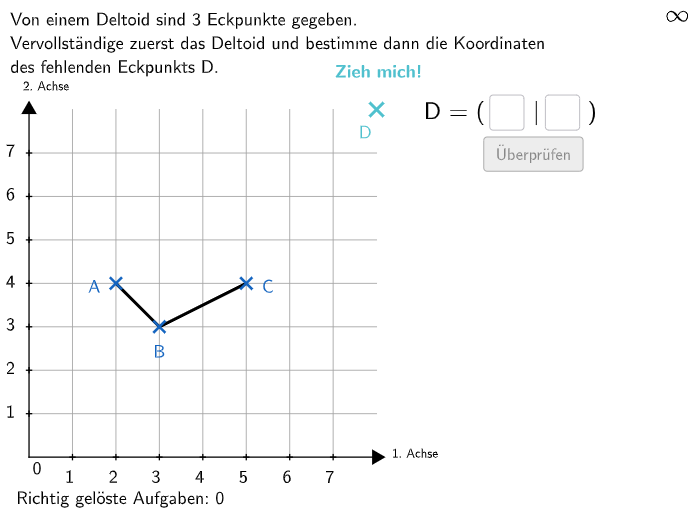
This example demonstrates how to construct special quadrilaterals in a coordinate system. Key mathematical concepts include geometric construction and properties of special quadrilaterals. It uses GeoGebra commands such as Sequence, Join, Vector, Line, and Polygon. Suitable for 5-6th grade students.
GeoGebra Commands & Parameters
Sequence(Sequence[(i, k), k, 0, 8], i, 0, 8) → PunkteFeldShuffle(Sequence[1, 7]) → HelperX, {2, 5, 6, 7, 3, 4, 1}Join({{0}, HelperX}) → UrsprungXListeShuffle(Sequence[1, 7]) → HelperY, {2, 6, 3, 5, 7, 1, 4}Join({{0}, HelperY}) → UrsprungYListeShuffle(Sequence[1, 7]) → AYList, {4, 7, 5, 3, 1, 2, 6}Shuffle(Sequence[1, 7]) → AXList, {2, 6, 3, 5, 7, 1, 4}Vector(Ursprung, A) → aCoordsLine(A, A + (-1, 0)) → iLine(A, A + (0, 1)) → hMax({distanceAnegX, distanceAposX, distanceAnegY, distanceAposY}) → maxfShuffle(Sequence[3, maxf, 1]) → fList, {3, 6, 4, 5}Random(1, fwert - 1) → erandoCircle(A, fwert) → cIntersect(c, h) → CSucheNegY, CSuchePosYIntersect(c, i) → CSuchePosX, CSucheNegXPolygon(QE1, QE2, QE3, QE4) → coordsystem, qe1, qe2, qe3, qe4RemoveUndefined({If[IsInRegion[CSuchePosY, coordsystem], y(CSuchePosY)], If[IsInRegion[CSuchePosX, coordsystem], y(CSuchePosX)], If[IsInRegion[CSucheNegX, coordsystem], y(CSucheNegX)], If[IsInRegion[CSucheNegY, coordsystem], y(CSucheNegY)]}) → CyOptionenRemoveUndefined({If[IsInRegion[CSuchePosY, coordsystem], x(CSuchePosY)], If[IsInRegion[CSuchePosX, coordsystem], x(CSuchePosX)], If[IsInRegion[CSucheNegX, coordsystem], x(CSucheNegX)], If[IsInRegion[CSucheNegY, coordsystem], x(CSucheNegY)]}) → CxOptionenRandom(1, Length[CxOptionen]) → CrandoVector(Ursprung, C) → cCoordsSegment(A, C) → jOrthogonalLine(MittelpunktDeltoid, j) → kPoint(PunkteFeld) → InputPunktMin(AbstaendeMittelpunkt) → maxeShuffle(Sequence[1, maxe]) → eList, {1, 2, 3}Circle(MittelpunktDeltoid, ewert) → dIntersect(d, k) → D, BVector(Ursprung, D) → dCoordsVector(Ursprung, B) → bCoordsShuffle({2, 4}) → gesuchtList, {4, 2}If(gesucht ≟ 1, x(aCoords), gesucht ≟ 2, x(bCoords), gesucht ≟ 3, x(cCoords), gesucht ≟ 4, x(dCoords)) → solxIf(gesucht ≟ 1, y(aCoords), gesucht ≟ 2, y(bCoords), gesucht ≟ 3, y(cCoords), gesucht ≟ 4, y(dCoords)) → solyCircle(SolPunkt, 0.35) → ValidateCircleIsInRegion(InputPunkt, ValidateCircle) → correctInputPunktTextfield(input1) → InputBox1Textfield(input2) → InputBox2Polygon(PtopLeftCornerFeedback, PtopRightCornerFeedback, PbottomRightCornerFeedback, PbottomLeftCornerFeedback) → rectangleCorrect, rectangleCorrectS3, rectangleCorrectS4, rectangleCorrectS2, rectangleCorrectS1Shuffle(Sequence[Random[0, 10], i, 1, 100]) → randomNosForX, {7, 1, 4, 3, 6, 10, 3, 10, 6, 0, 5, 6, 5, 6, 1, 4, 10, 5, 3, 3, 2, 1, 0, 8, 9, 0, 2, 9, 6, 2, 9, 10, 3, 5, 3, 7, 1, 6, 7, 6, 5, 5, 9, 5, 1, 8, 10, 10, 9, 8, 10, 4, 5, 10, 7, 6, 9, 4, 10, 7, 6, 2, 2, 1, 6, 2, 0, 8, 9, 3, 4, 0, 2, 3, 4, 10, 7, 8, 0, 2, 3, 8, 5, 4, 7, 4, 1, 6, 1, 3, 3, 3, 3, 2, 8, 6, 6, 3, 1, 9}Element(randomNosForX, Mod[questionCount, 100] + 1) → numXShuffle(Sequence[Random[0, 10], i, 1, 100]) → randomNosForY, {2, 7, 6, 2, 0, 10, 7, 9, 9, 6, 7, 3, 5, 6, 7, 0, 9, 5, 6, 0, 6, 2, 8, 10, 1, 4, 10, 1, 1, 10, 1, 10, 4, 9, 2, 9, 2, 3, 7, 1, 4, 0, 1, 4, 1, 0, 6, 9, 9, 10, 0, 9, 6, 8, 2, 3, 6, 8, 0, 5, 10, 6, 6, 8, 10, 6, 2, 4, 3, 7, 8, 6, 3, 7, 2, 4, 7, 2, 8, 4, 10, 8, 8, 1, 7, 9, 0, 10, 6, 5, 1, 9, 4, 4, 9, 1, 4, 6, 9, 5}Element(randomNosForY, Mod[questionCount, 100] + 1) → numYAppend(true, Sequence[If[randomNosForX(i) ≟ randomNosForX(i - 1), false, true], i, 2, 100]) → stayXAppend(true, Sequence[If[randomNosForY(i) ≟ randomNosForY(i - 1), false, true], i, 2, 100]) → stayYRemove(Sequence[If[stayX(i), randomNosForX(i), 0], i, 1, 100], Sequence[0, i, 1, 100]) → randomNosForXwithoutRepeatRemove(Sequence[If[stayY(i), randomNosForY(i), 0], i, 1, 100], Sequence[0, i, 1, 100]) → randomNosForYwithoutRepeatElement(randomNosForXwithoutRepeat, Mod[questionCount, Length[randomNosForXwithoutRepeat]] + 1) → numXwithoutRepeatElement(randomNosForYwithoutRepeat, Mod[questionCount, Length[randomNosForYwithoutRepeat]] + 1) → numYwithoutRepeatSequence(QE4 + (Vector[QE4, QE3] / 8 * i), i, 1, 7) → GrenzPunkteObenSequence(QE1 + (Vector[QE1, QE2] / 8 * i), i, 1, 7) → GrenzPunkteUntenSequence(QE1 + (Vector[QE1, QE4] / 8 * i), i, 1, 7) → GrenzPunkteLinksSequence(QE2 + (Vector[QE1, QE4] / 8 * i), i, 1, 7) → GrenzPunkteRechtsSequence(Segment[GrenzPunkteOben(i), GrenzPunkteUnten(i)], i, 1, 9) → GitterVertikalSequence(Segment[GrenzPunkteRechts(i), GrenzPunkteLinks(i)], i, 1, 9) → GitterHorizontalLine(Ursprung, HelpP1) → fLine(Ursprung, HelpP2) → gIntersect(g, QuadratKanten(2)) → EndXPosIntersect(g, QuadratKanten(4)) → EndXNegIntersect(f, QuadratKanten(1)) → EndYNegIntersect(f, QuadratKanten(3)) → EndYPosSegment(EndYPos, EndYNeg) → yAchselSegment(EndXPos, EndXNeg) → xAchselPolygon(C, B, A, D) → v1, c_{1}, c_2, a, d_1Segment(C, B) → solbSegment(B, A) → solaSegment(A, D) → soldSegment(D, C) → solcSequence(EndXNeg + (Vector[EndXNeg, EndXPos] * i / 8), i, 1, 7) → AchsenpunkteXSequence(EndYNeg + (Vector[EndYNeg, EndYPos] * i / 8), i, 1, 7) → AchsenpunkteYSequence(Distance[AchsenpunkteX(i), Ursprung], i, 1, 7) → BeschriftungXAchseSequence(Distance[AchsenpunkteY(i), Ursprung], i, 1, 7) → BeschriftungYAchseVector(Ursprung, InputPunkt) → OrangeCoordsText(BeschHelpA, BeschAP, false, true, 0, 0) → BeschTextAText(BeschHelpB, BeschBP, false, true, 0, 0) → BeschTextBText(BeschHelpC, BeschCP, false, true, 0, 0) → BeschTextCText(BeschHelpD, BeschDP, false, true, 0, 0) → BeschTextDCircle(InputPunkt, 0.3) → eSegment(E, E + (0, (-LA))) → l
AI Drawing Prompt Reference
In a coordinate system, first determine a starting point, then use vectors and a circle to construct four points connected to the starting point to form a quadrilateral. Next, construct a rhombus and intersect a circle with the perpendicular line of the rhombus to obtain two points, then connect these points to the starting point to form another quadrilateral. Finally, input a point and verify if it lies within a rectangle.
The prompt above was compiled from the original drawing commands and is for reference only.