
Geometric Construction for the Area of a Rectangle
Loading the math board and drawing, please wait…
In collections
geometriadinamica.es
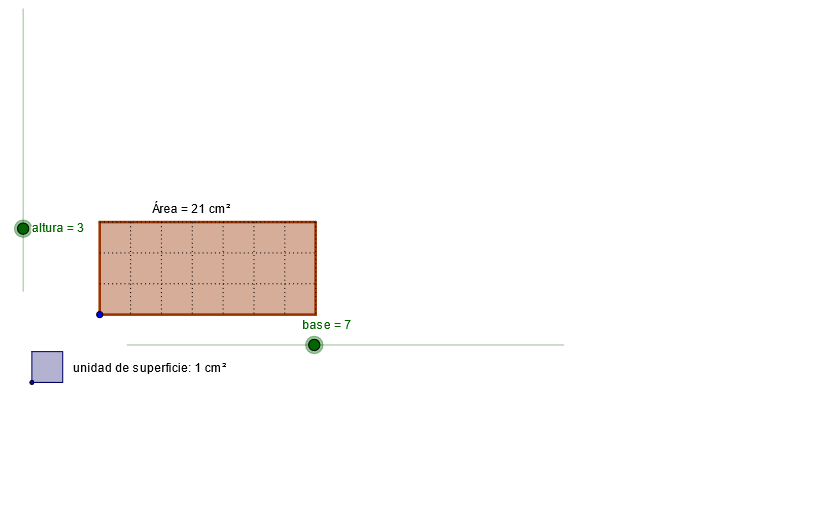
This GeoGebra example demonstrates how to construct a rectangle using perpendicular and intersection relationships, then verify its area using the rectangle’s side measures (base and height). The key math concepts are rectangle properties (opposite sides parallel, adjacent sides perpendicular), constructing perpendicular lines, locating vertices via intersections, and using segment lengths as geometric quantities. Construction highlights: it employs GeoGebra commands Circle, Ray, OrthogonalLine, Intersect, Polygon, Mirror, Segment, and Point to build the configuration. From the provided construction summary, it uses objects such as base and altura (height), and multiple labeled points (e.g., a_1, c_1, e_1, d_1) to define key vertices. OrthogonalLine establishes the height direction, Intersect determines corner points, Polygon closes the region into a rectangle, Segment provides the base/height measurements for the area relation, and Mirror generates corresponding structures to support geometric validation. Suitable for middle-school geometry instruction, interactive construction practice, and teacher-led demonstrations on why area equals base times height.
GeoGebra Commands & Parameters
Circle(A, base) → cRay(A, B) → aCircle(A, altura) → dOrthogonalLine(A, a) → bIntersect(d, b, 1) → COrthogonalLine(C, b) → eIntersect(c, a, 1) → DOrthogonalLine(D, a) → fIntersect(f, e) → EPolygon(A, C, E, D) → P, a_1, c_1, e_1, d_1Circle(A, g) → hIntersect(h, a_1) → F,Intersect(h, d_1) → G,Mirror(A, G) → HMirror(G, H) → IMirror(H, I) → JMirror(I, J) → KMirror(J, K) → LMirror(K, L) → MMirror(L, M) → NMirror(M, N) → OMirror(N, O) → QMirror(O, Q) → RMirror(Q, R) → SMirror(R, S) → TMirror(S, T) → UMirror(A, F) → VMirror(F, V) → WMirror(V, W) → YMirror(W, Y) → ZMirror(Y, Z) → A_1Mirror(Z, A_1) → B_1Mirror(A_1, B_1) → C_1Mirror(B_1, C_1) → D_1OrthogonalLine(G, d_1) → iOrthogonalLine(H, d_1) → jOrthogonalLine(I, d_1) → kOrthogonalLine(J, d_1) → lOrthogonalLine(K, d_1) → mOrthogonalLine(L, d_1) → nOrthogonalLine(M, d_1) → pOrthogonalLine(N, d_1) → qOrthogonalLine(O, d_1) → rOrthogonalLine(Q, d_1) → sOrthogonalLine(R, d_1) → tOrthogonalLine(S, d_1) → b_1OrthogonalLine(T, d_1) → f_1OrthogonalLine(U, d_1) → g_1OrthogonalLine(F, a_1) → h_1OrthogonalLine(V, a_1) → i_1OrthogonalLine(W, a_1) → j_1OrthogonalLine(Y, a_1) → k_1OrthogonalLine(Z, a_1) → l_1OrthogonalLine(A_1, a_1) → m_1OrthogonalLine(B_1, a_1) → n_1OrthogonalLine(C_1, a_1) → p_1OrthogonalLine(D_1, a_1) → q_1Intersect(c_1, i) → E_1Intersect(r, c_1) → F_1Segment(F_1, O) → r_1Intersect(j, c_1) → G_1Intersect(k, c_1) → H_1Intersect(l, c_1) → I_1Intersect(m, c_1) → J_1Intersect(n, c_1) → K_1Intersect(p, c_1) → L_1Intersect(q, c_1) → M_1Intersect(s, c_1) → N_1Intersect(t, c_1) → O_1Intersect(b_1, c_1) → P_1Intersect(f_1, c_1) → Q_1Intersect(g_1, c_1) → R_1Intersect(e_1, q_1) → S_1Intersect(e_1, p_1) → T_1Intersect(e_1, n_1) → U_1Intersect(m_1, e_1) → V_1Intersect(l_1, e_1) → W_1Intersect(k_1, e_1) → Y_1Intersect(j_1, e_1) → Z_1Intersect(i_1, e_1) → A_2Intersect(h_1, e_1) → B_2Segment(E_1, G) → s_1Segment(G_1, H) → t_1Segment(H_1, I) → a_2Segment(I_1, J) → b_2Segment(J_1, K) → c_2Segment(K_1, L) → d_2Segment(L_1, M) → e_2Segment(M_1, N) → f_2Segment(N_1, Q) → g_2Segment(O_1, R) → h_2Segment(P_1, S) → i_2Segment(Q_1, T) → j_2Segment(R_1, U) → k_2Segment(D_1, S_1) → l_2Segment(C_1, T_1) → m_2Segment(B_1, U_1) → n_2Segment(A_1, V_1) → p_2Segment(Z, W_1) → q_2Segment(Y, Y_1) → r_2Segment(W, Z_1) → s_2Segment(V, A_2) → t_2Segment(F, B_2) → a_3Circle(C_2, o) → c_3Point(c_3) → D_2Segment(C_2, D_2) → b_3Circle(D_2, C_2) → d_3OrthogonalLine(D_2, b_3) → e_3OrthogonalLine(C_2, b_3) → f_3Intersect(c_3, f_3, 2) → E_2Intersect(d_3, e_3, 2) → F_2Polygon(E_2, F_2, D_2, C_2) → P_2, e_4, f_4, d_4, c_4
AI Drawing Prompt Reference
Draw a rectangle with a horizontal base ray and a vertical height ray. Start from the base endpoint, construct a perpendicular line to the base, intersecting the height circle to get the first vertex. From this vertex, draw another perpendicular line to intersect the base circle, obtaining the second vertex. The intersection of these two perpendicular lines gives the third vertex. Connect the four vertices to form the rectangle. Then, using one rectangle vertex as center, draw a circle with a given radius, intersecting two sides of the rectangle at two points. From these points, construct a series of perpendicular lines along the rectangle sides, and use mirror reflections to create a symmetric grid inside the rectangle, illustrating that the area equals base times height.
The prompt above was compiled from the original drawing commands and is for reference only.